


Quenza is a client-engagement and practice-management platform designed for coaches, therapists, counselors, dietitians, consultants, and other helping professionals. It allows practitioners to create exercises, assessments, forms, homework, tasks, and structured programs that clients complete between appointments.
The platform combines activity creation, automated program delivery, private notes, client portals, secure messaging, progress monitoring, file sharing, groups, and mobile applications. Its central purpose is to extend the practitioner’s work beyond scheduled sessions while reducing the administrative effort involved in distributing and reviewing client materials.
Quenza is particularly valuable for professionals who use repeatable exercises and structured development programs. However, it is not a complete system for website creation, lead generation, appointment booking, contracts, payments, accounting, or electronic health records. Businesses may therefore need to combine it with other services.
Bonus Free Guide Included
What Is Quenza?
Quenza is cloud-based software for creating, delivering, and monitoring digital client activities. Practitioners can use it to replace worksheets, emailed documents, shared drives, spreadsheets, and manually scheduled homework.
The platform can support life coaching, executive coaching, career coaching, wellness programs, nutrition counseling, personal development, relationship coaching, employee development, consulting, educational support, and selected therapeutic workflows.
Professionals can create resources from scratch or use Quenza’s library of prepared activities. These materials are assigned individually, sent to groups, or combined into automated multi-step programs. Clients access their assignments through a private portal or mobile application.
Quenza’s official website describes the platform as a way to deliver personalized exercises, monitor completion, communicate between sessions, and automate structured programs.
How Quenza Works
A practitioner creates a workspace and adds clients. The professional can then select a prebuilt resource or create a customized activity containing instructions, questions, scales, media, and response fields.
Activities can be assigned immediately or scheduled for future delivery. Clients receive a notification and complete the material through their portal or mobile application. The practitioner can monitor completion, review responses, provide feedback, and send reminders.
Several activities can be connected to form a program. Once a program begins, Quenza releases its components according to the creator’s schedule. This reduces the need to send every worksheet, reflection, or follow-up message manually.
Explore The AI-Linked Asset Class Elites are Investing In
Activities
Activities are the foundation of Quenza. They can function as worksheets, intake forms, questionnaires, assessments, reflections, homework, evaluations, journals, consent forms, action plans, or educational lessons.
The Activity Builder enables professionals to combine instructions with text fields, multiple-choice questions, rating scales, media, and other interactive elements. Files can be attached to an activity, and clients can upload their own files where enabled.
Practitioners can reuse an activity, duplicate it, personalize it for an individual client, or include it in several programs. Recent platform updates also allow clients to edit responses after completing certain activities.
Activity Library
Quenza provides a library of professionally prepared activities. The number available depends on the selected subscription.
Spark includes a Core library containing more than 100 activities, Growth expands access to more than 200, and Impact or higher plans provide a Premium collection containing more than 400 activities.
Library resources can reduce preparation time and introduce practitioners to new intervention formats. However, users remain responsible for confirming whether a particular activity is suitable for their qualifications, methodology, clients, and jurisdiction. A platform template does not automatically represent clinical advice or an evidence-based intervention for every situation.
Custom Assessments and Forms
Quenza can be used to create intake questionnaires, satisfaction surveys, progress assessments, self-reflections, feedback forms, check-in forms, goal evaluations, and coaching questionnaires.
Practitioners can collect qualitative responses and use scales to measure changes over time. Forms may be distributed before an initial session, during a program, or after completion.
Although these tools are flexible, Quenza is not a specialist psychometric-testing service. Practitioners using validated instruments must follow the instrument owner’s licensing, scoring, interpretation, and administration requirements.
Programs
Programs organize multiple activities into structured client journeys. A program might contain onboarding forms, weekly exercises, educational content, progress reviews, homework, and a final evaluation.
Each element can be scheduled to arrive at a particular stage. Once the program is assigned, Quenza automatically delivers its activities over several days or weeks. This can support coaching packages, wellness challenges, leadership-development programs, habit-change interventions, and structured therapeutic support.
Programs are included in every current subscription. This makes even the entry-level plan useful for solo professionals with a small number of clients.
Tasks and Recurring Tasks
Practitioners can assign specific tasks that clients must complete. Tasks may represent actions such as making an appointment, practicing a technique, recording an observation, uploading a document, or completing an offline activity.
Growth and higher plans support recurring tasks that are generated automatically on a daily, weekly, or monthly schedule. This is useful for habits, routine check-ins, meal tracking, wellness practices, accountability programs, and repeated administrative requirements.
Tasks complement activities but do not replace a complete project-management system. Complex dependencies, team projects, time tracking, resource allocation, and operational workflows may require another platform.
Client Portal
Every plan includes a client portal through which clients can view assigned activities, programs, tasks, shared resources, messages, and progress. This gives clients one organized location instead of requiring them to search through email attachments and unrelated links.
The portal can improve consistency because the practitioner controls which material each client sees. Clients can also return to earlier exercises, review responses, and maintain contact between sessions.
Impact and higher plans support a custom domain for the portal. This allows practices to provide a more branded experience instead of directing clients to a standard Quenza address.
Mobile Applications
Quenza provides mobile applications for iOS and Android. Both practitioners and clients can access relevant features from supported mobile devices.
Clients can receive notifications, complete activities, review tasks, upload information, and communicate with their practitioner. Professionals can monitor assignments and maintain contact while away from a desktop computer.
Before subscribing, organizations should test the mobile experience with their typical forms, media, file sizes, and client devices. A complex worksheet that works well on a computer may be more difficult to complete on a small screen.
Progress Tracking
Quenza shows the status of assigned activities and programs in real time. Practitioners can identify which clients have started, completed, or ignored an assignment and review the answers that have been submitted.
This helps professionals prepare for sessions and recognize when a client may need encouragement or additional support. Progress data can also reveal where clients regularly disengage from a program.
The reporting is designed primarily for individual client engagement. Organizations requiring advanced outcome measurement, statistical analysis, population reporting, predictive risk scoring, or custom dashboards may need an external analytics system.
Notes
Quenza allows professionals to create private notes associated with clients. These notes can be used to record session summaries, observations, follow-up items, program decisions, or preparation for future meetings.
Practitioners should establish clear policies covering what is recorded, who can access it, how long it is retained, and how it will be exported or deleted. Professionals subject to clinical recordkeeping rules must confirm independently whether Quenza’s current features and contractual terms satisfy their obligations.
Chat and Between-Session Support
The platform includes one-to-one chat so clients can ask questions and practitioners can provide feedback between meetings. This can strengthen accountability and help clients resolve difficulties before the next scheduled appointment.
Collective and Beyond plans also provide team chat for collaboration among professionals. Chat should not be treated as an emergency or crisis-response channel unless the organization has established appropriate staffing and procedures.
Professionals should communicate expected response times, availability, confidentiality boundaries, and emergency instructions during onboarding.
Groups
Growth and higher subscriptions allow practitioners to organize clients into groups. Activities and programs can then be distributed to multiple participants rather than assigned individually.
Groups can support coaching cohorts, wellness challenges, workshops, employee-development programs, group therapy resources, educational programs, and client communities. Bulk assignment reduces repetitive work when participants require the same material.
Quenza also supports rolling groups. When enabled, new participants can automatically receive activities and programs previously assigned to the group. Practitioners can instead choose which earlier resources a late participant should receive.
Quenza’s group functionality focuses on program delivery rather than social networking. Businesses requiring public feeds, extensive community discussions, events, member directories, livestreaming, or gamification may prefer a dedicated community platform.
File Sharing
Growth and higher plans provide file sharing. Professionals can distribute PDFs, audio, video, worksheets, presentations, and other resources, while clients can upload requested material through activities.
The pricing page currently describes storage as unlimited across all plans. Nevertheless, businesses should verify individual file-size restrictions, acceptable formats, fair-use provisions, export procedures, and what happens to files after cancellation.
Branding and White-Label Features
Growth permits a custom logo, allowing practices to replace some standard presentation with their own identity. Impact adds custom domains and a custom sender address for system emails.
These features help create a more consistent experience for clients. Emails, portal addresses, and visual elements can appear connected to the practitioner’s organization rather than an unrelated software provider.
Quenza’s branding controls do not necessarily constitute a completely white-labeled application. Prospective buyers should test every client-facing page, notification, email, login screen, and mobile-app reference if removing the Quenza identity is essential.
Client Management
Quenza provides a centralized record for each client. Practitioners can review assignments, program participation, responses, tasks, files, notes, messages, and status without searching across several services.
Clients can be archived when they become inactive, allowing professionals to keep their active lists organized without immediately removing historical information. Bulk imports and assignments can also simplify administration for larger practices.
Quenza functions as a client-engagement database rather than a conventional sales CRM. It does not focus on lead pipelines, marketing attribution, proposals, contracts, revenue forecasting, or customer acquisition.
Team Features
Collective is intended for organizations with several practitioners. It supports as many as three professional accounts, 500 clients, team chat, API access, and five webhooks.
Beyond removes the standard limits on clients and professionals and adds roles, permissions, unlimited webhooks, and priority support. Fine-grained permissions are important when different practitioners, administrators, supervisors, and support employees require different levels of access.
Businesses considering Collective should check whether three professional accounts are sufficient and determine the cost of moving to Beyond if the team expands.
Integrations, Webhooks, and API Access
Quenza uses webhooks and an API to connect with external business systems. Growth includes one webhook, Impact includes two, Collective includes five, and Beyond provides unlimited webhooks. API access begins with Collective.
These capabilities can support client onboarding, data synchronization, notifications, external reporting, and customized organizational workflows. The platform has also documented connections involving Calendly and Google Calendar, although availability may depend on the selected plan and current implementation.
Buyers should verify the exact events, fields, authentication methods, rate limits, and supported actions before relying on an integration. Access to a webhook or API does not guarantee that every part of a client record can be transferred.
Scheduling
Quenza is primarily a client-engagement and program-delivery platform rather than a comprehensive booking system. Calendar-related integrations can help connect elements of a practitioner’s workflow, but businesses requiring public appointment pages, availability management, rescheduling, deposits, cancellation enforcement, and complex team calendars may still need scheduling software.
A prospective user should test how Quenza works with Calendly, Google Calendar, or another existing booking system before migrating clients.
Payments and Invoicing
Quenza’s current pricing comparison describes invoicing as a planned feature. Buyers should therefore not assume that the platform presently replaces Stripe, PayPal, accounting software, or a specialized practice-billing system.
Practitioners may still need external services to sell packages, collect deposits, create subscriptions, issue invoices, manage taxes, and reconcile payments. Organizations should verify the live status of invoicing before making a purchasing decision.
Security and Privacy
Quenza describes its platform as secure and provides controls intended to protect client communication and stored information. However, professionals should evaluate its current privacy terms rather than relying on older Quenza articles.
This distinction is especially important for US healthcare providers. Quenza’s privacy policy, updated August 4, 2026, explicitly states that the service is not HIPAA compliant and does not offer Business Associate Agreements.
Some older Quenza blog articles described the platform as HIPAA compliant, but those statements conflict with the current legal policy and should be treated as outdated.
A US covered entity or business associate handling protected health information should therefore not adopt Quenza without obtaining appropriate legal and compliance advice. Encryption or general security features do not independently establish HIPAA compliance.
Organizations operating under the GDPR or other privacy legislation should also review data-processing terms, hosting arrangements, retention policies, subcontractors, breach procedures, deletion rights, and international-transfer mechanisms.
Quenza Pricing
Quenza currently offers five subscription levels: Spark, Growth, Impact, Collective, and Beyond. Spark costs $25 per month, or an effective $20 per month with annual billing, and supports up to 10 clients.
Growth costs $50 monthly or $40 per month when billed annually and accommodates up to 250 clients. Impact supports as many as 400 clients and costs $125 monthly or an effective $100 per month annually.
Collective increases the client allowance to 500 and costs $160 per month or $128 per month with annual billing. Beyond provides unlimited client capacity and uses customized pricing.
Annual subscriptions offer a stated 20% discount, and all new plans include a 30-day trial without requiring a credit card. Existing subscribers may retain legacy pricing unless they voluntarily switch to one of the current plans.
Spark Plan
Spark is intended for solo professionals beginning with a small client list. It costs $25 with monthly billing or an effective $20 per month when billed annually.
The plan supports 10 clients and one professional. It includes activities, programs, notes, tasks, one-to-one chat, unlimited storage, client and practitioner mobile applications, and more than 100 prepared activities.
The ten-client limit makes Spark suitable for testing Quenza or operating a small practice. Professionals expecting to exceed that limit will need Growth.
Growth Plan
Growth costs $50 per month or an effective $40 per month with annual billing. It supports one professional and as many as 250 clients.
The plan includes everything in Spark and adds groups, file sharing, recurring tasks, a custom logo, one webhook, and a library containing more than 200 activities.
The large increase from 10 to 250 clients makes Growth the most practical plan for many established solo practitioners. It is also the first plan suited to structured group delivery.
Impact Plan
Impact costs $125 monthly or an effective $100 per month under annual billing. It supports one professional and up to 400 clients.
In addition to the Growth features, it provides custom domains, a custom email sender, two webhooks, and access to more than 400 prepared activities.
Impact is intended for solo power users who require a more branded client experience and the largest content library. The price increase is substantial, so practitioners should determine whether custom branding and additional resources justify the difference.
Collective Plan
Collective costs $160 per month or an effective $128 per month when billed annually. It supports as many as 500 clients and three professionals.
The plan adds team chat, API access, and five webhooks to the Impact feature set. It is designed for small practices in which several practitioners collaborate within one workspace.
Organizations should confirm how clients are assigned to professionals, what administrators can view, and whether the lack of fine-grained roles below Beyond meets their confidentiality requirements.
Beyond Plan
Beyond uses customized pricing and is intended for organizations delivering services at scale. It provides unlimited clients and professional accounts, roles and permissions, unlimited webhooks, and priority support.
Buyers should request a detailed proposal covering implementation, migration, security, data processing, API limits, support, professional services, renewal terms, and contractual service commitments.
Free Trial
Every current plan includes a 30-day trial without requiring payment details. The trial gives professionals time to test the activity builder, client experience, program automation, mobile applications, and content library.
Users should conduct a realistic pilot rather than exploring only the practitioner dashboard. Adding test clients and completing activities from a client device will reveal whether the experience fits the intended program.
Additional Costs
Quenza’s subscription price may not represent the complete cost of running a practice. Additional expenses can include scheduling software, payment processing, invoicing, accounting, video conferencing, electronic signatures, website hosting, email marketing, CRM software, legal advice, professional insurance, custom development, data migration, and staff training.
Healthcare or regulated practices may also require a compliant electronic health record, telehealth system, consent platform, auditing service, and specialist privacy review. These costs should be considered before replacing an existing practice-management system.
Ease of Use
Quenza is designed to make structured client engagement accessible without coding. Its prepared activities and visual builder can save considerable time compared with creating, formatting, emailing, and tracking worksheets manually.
The platform becomes more complex when a practice develops many custom activities, programs, groups, and automations. Naming conventions, folders, templates, ownership rules, and testing procedures can prevent the workspace from becoming disorganized.
Client adoption is equally important. Practitioners should provide clear onboarding instructions and avoid overwhelming clients with excessive notifications or assignments.
Customer Support and Reviews
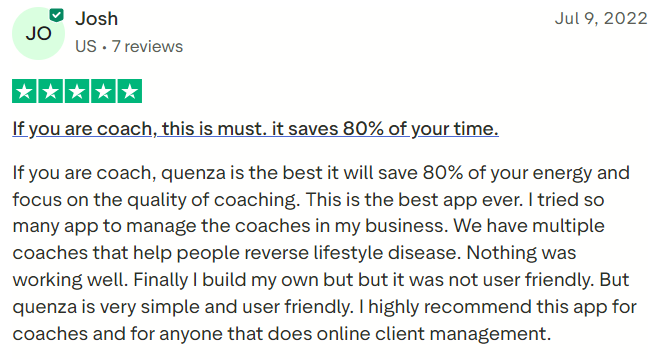
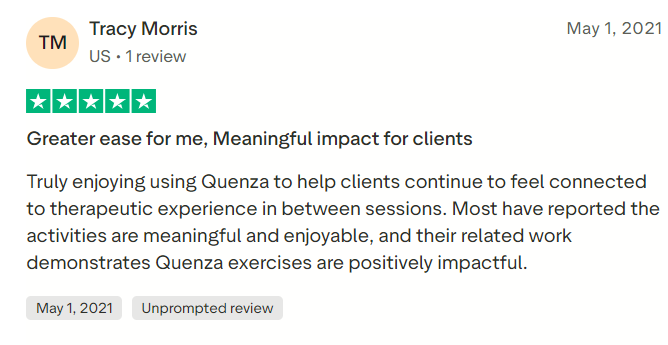
Quenza provides an online knowledge base, product updates, demonstrations, and support. Customer reviews often praise its activity library, user-friendly interface, client engagement, and responsive service.
As of August 2026, Quenza’s Trustpilot profile contained only eight reviews. The displayed TrustScore was 4.5, while the profile’s separate overall figure showed 4.3. All reviews were four or five stars, but none had been submitted during the previous 12 months. The sample is too small and old to support firm conclusions about current satisfaction.
Capterra also contains positive comments about client progression and customer support. Buyers should examine the most recent Quenza Capterra listing and conduct their own trial rather than relying solely on historical ratings.
#1.
#2.
Quenza Pros
Quenza provides a strong system for creating and delivering client exercises, assessments, forms, tasks, and structured programs. Automated scheduling can reduce repetitive administration, while real-time status information helps practitioners identify disengaged clients.
Other advantages include private notes, chat, groups, mobile applications, client portals, file sharing, reusable templates, a substantial content library, custom branding, webhooks, team plans, and API access at higher levels. The 30-day trial also provides enough time for a meaningful pilot.
Quenza Cons
Quenza does not provide a complete website, sales funnel, appointment-booking, payment, contract, or accounting system. Invoicing is currently described as planned, so external business tools may remain necessary.
Spark’s ten-client limit is restrictive, while Impact’s branding features require a significant price increase. Collective supports only three professionals, and detailed roles and permissions require a customized Beyond agreement.
Most importantly, Quenza’s current privacy policy states that the platform is not HIPAA-compliant and does not provide Business Associate Agreements. This makes it unsuitable for US healthcare workflows involving protected health information where a BAA is required.
Final Verdict
Quenza is a capable client-engagement platform for professionals who want to deliver structured support between sessions. Its greatest strengths are its flexible Activity Builder, automated Programs, prepared content library, client portals, mobile applications, progress monitoring, chat, and group assignments.
Its principal limitations are the absence of a complete commercial practice-management system, sharp price increases for advanced branding, restrictive team limits, and its current lack of HIPAA compliance and Business Associate Agreements.
Overall, Quenza is best for coaches and non-HIPAA-dependent helping professionals who prioritize personalized exercises and automated client journeys. Prospective customers should test the complete client experience, calculate the cost of complementary software, and review the current privacy policy before subscribing.
