


MemberPress is a WordPress membership plugin designed for creators and organizations that want to sell subscriptions, protect premium content, deliver courses, or operate paid online communities.
Unlike hosted services such as Kajabi or Thinkific, MemberPress runs directly on a WordPress website, giving businesses greater ownership and control over their content, customer information, design, and technology.
The platform has expanded considerably beyond basic membership management. Its current product includes an integrated learning-management system, community features, coaching tools, subscription billing, content dripping, coupons, corporate accounts, affiliate management, and marketing integrations.
This makes MemberPress a potentially valuable option for course creators, coaches, publishers, associations, and subscription businesses—provided they are comfortable managing WordPress.
Bonus Free Guide Included
What Is MemberPress?
MemberPress is a premium WordPress plugin that helps website owners restrict content and sell access through free or paid memberships. Administrators can create multiple membership levels, establish access rules, collect one-time or recurring payments, and give customers a self-service account area.
MemberPress can be used to sell online courses, coaching programs, premium articles, paid newsletters, private podcasts, digital downloads, professional certifications, community memberships, subscription-based content libraries, corporate training, association memberships, and group or bulk-access licenses.
Because it operates within WordPress, creators retain control over their website and can combine MemberPress with their preferred themes, page builders, analytics tools, email-marketing platforms, and other WordPress plugins.
How MemberPress Works
After purchasing a license, the user installs and activates MemberPress on a WordPress website. The administrator then creates membership levels, selects the price and billing schedule, connects a supported payment processor, and determines what each membership can access.
MemberPress uses access rules to protect website content. A rule can restrict an individual page, post, course, category, tag, custom post type, file, or selected section of a page. Customers who purchase the appropriate membership receive access automatically.
Memberships may be free, offered for a single payment, or billed on a recurring basis. The platform supports trials, limited payment cycles, upgrades, downgrades, prorated changes, expiration dates, and customer cancellations.
Explore The AI-Linked Asset Class Elites are Investing In
Membership and Subscription Management
MemberPress supports unlimited memberships, members, and subscriptions across its current plans. Businesses can therefore create several access levels without paying according to their total number of students or subscribers.
Possible membership structures include:
- Monthly and annual subscriptions
- Lifetime access
- Free memberships
- Paid trials
- Introductory offers
- Fixed-term access
- Tiered memberships
- Course bundles
- Group subscriptions
- Corporate accounts
The self-service member dashboard lets customers review their subscriptions, update account information, and manage supported billing actions. Administrators can also monitor transactions, subscriptions, failed payments, and expiration dates from WordPress.
Content Protection
Content protection is one of MemberPress’s strongest capabilities. Its Smart Rules system allows administrators to control access according to a customer’s membership, purchase, course enrollment, or other conditions.
Businesses can protect:
- Individual posts and pages
- Entire categories
- Content with selected tags
- Custom post types
- Course lessons
- Videos and podcasts
- Downloadable files
- Sections of a page
- Child pages
- Specific URLs
MemberPress can also display unauthorized-access messages or direct visitors to a registration page. The platform supports content dripping and expiration on Growth and Scale, allowing material to be released gradually or removed after a specified period.
MemberPress Courses
MemberPress Courses is the platform’s integrated WordPress learning-management system. It enables creators to build and sell courses without installing a separate LMS.
Its course functionality includes:
- Unlimited courses and lessons
- A visual curriculum builder
- WordPress block-editor support
- Progress tracking
- Quizzes
- Assignments
- Certificates
- Content dripping
- Course-access rules
- An AI course generator
- Gradebook functionality on the highest plan
The Launch plan includes unlimited courses and lessons, but several advanced features are reserved for Growth or Scale. Quizzes, assignments, certificates, and curriculum dripping require at least Growth, while the centralized quiz and assignment gradebook is limited to Scale.
MemberPress also offers an AI course generator that can produce editable course outlines and lesson drafts. Each plan includes an annual allocation of AI credits.
Coaching With CoachKit
CoachKit extends MemberPress for structured coaching programs. It can be used to organize clients, cohorts, milestones, habits, and program materials within a WordPress membership site.
Coaches can use it to deliver:
- One-to-one coaching
- Group coaching
- Cohort programs
- Accountability programs
- Client milestones
- Habit tracking
- Course-supported coaching
- Scheduled consultations
Scheduling integrations are available for products such as Calendly and Simply Schedule Appointments. CoachKit is currently included with the Growth and Scale plans rather than Launch.
Community Features
MemberPress now includes ClubSuite, a collection of community and networking tools. Growth customers can create profiles, searchable directories, forums, and private discussion groups known as Circles.
Scale adds direct messaging and live chat functionality. These features can help businesses keep conversations on their own websites instead of directing members to Facebook Groups, Slack, or a separate community platform.
This integration is particularly useful for businesses that want membership billing, learning content, and community activity connected to the same WordPress user account.
Payment Processing
MemberPress supports several payment methods, but availability depends on the selected plan.
The Launch plan supports Stripe and applies a 4.9% MemberPress transaction fee to Stripe payments. Growth adds PayPal, Square, and offline payments while eliminating the MemberPress percentage fee. Scale additionally supports Authorize.net.
Payment processors still impose their normal processing charges. Therefore, “0% transaction fees” on Growth and Scale means no additional MemberPress percentage fee; it does not eliminate Stripe, PayPal, Square, or Authorize.net charges. MemberPress’s payment-gateway documentation explains the plan requirements and payment limitations.
Coupons and Pricing Pages
Administrators can create percentage-based or fixed-value coupons, establish expiration dates, limit coupon usage, and offer discounted trials. Memberships can also be grouped together to create comparison-style pricing pages.
ReadyLaunch supplies predesigned registration, account, login, and pricing pages. This helps new users establish a functional membership area without writing code, although businesses wanting a highly customized design may still need CSS, a page builder, or professional development.
MemberPress also offers order bumps on qualifying plans, allowing businesses to promote an additional membership, service, subscription, or digital product during registration.
Email Marketing and Automation
MemberPress includes automated administrative and reminder emails. These may be used for events such as:
- New registrations
- Subscription expirations
- Failed payments
- Upcoming renewals
- Abandoned registrations
- Payment receipts
- Account changes
Launch includes a Mailchimp integration, while Growth and Scale provide access to a wider marketing-integration suite. Supported services can include ActiveCampaign, Kit, Drip, AWeber, MailPoet, and other email platforms.
Scale adds Zapier, webhooks, and REST API access for more sophisticated workflows. Businesses requiring complex lead scoring, behavioral automation, or multichannel campaigns will generally still need a dedicated marketing-automation platform.
Reporting
MemberPress includes reports for monitoring membership activity and revenue. Administrators can examine information such as:
- Completed transactions
- Refunds
- Subscription activity
- Membership sales
- Recurring revenue
- Member growth
- Course progress
- Quiz and assignment results
- Failed payments
- Coupon performance
The reporting tools are suitable for routine membership administration. Organizations needing advanced financial forecasting, detailed customer analytics, or custom business-intelligence dashboards may need additional WordPress reporting products or external analytics software.
Integrations
MemberPress integrates with a wide range of WordPress and third-party products, including Stripe, PayPal, Square, Authorize.net, Mailchimp, ActiveCampaign, Kit, Drip, AWeber, Zapier, Elementor, Divi, Beaver Builder, WPBakery, bbPress, TaxJar, Quaderno, Stripe Tax, Amazon S3, and Calendly.
Integration availability varies by subscription level, so buyers should review the latest plan comparison before purchasing particularly if a specific payment gateway, page builder, email-marketing service, or automation tool is essential to their operations.
MemberPress Pricing
MemberPress offers three annual subscription plans. Launch costs an introductory $199.50 for the first year, renews at $399 annually, and carries a 4.9% MemberPress transaction fee.
Growth starts at $349.50 and renews at $699 per year, while Scale begins at $499.50 and renews at $999 per year; neither Growth nor Scale charges a MemberPress transaction fee. These introductory prices are promotional and apply only to the initial subscription term, after which licenses renew at the standard rate.
All prices are in US dollars, and purchases include a 14-day money-back guarantee. Because prices and promotions may change, prospective customers should confirm the latest offer on the official MemberPress pricing page before purchasing.
Launch
Launch is designed for creators beginning a membership or course business. It includes unlimited memberships, members, subscriptions, courses, and lessons, along with Stripe payments, coupons, automated reminders, content-protection rules, basic reporting, and the AI course generator.
Its largest disadvantage is the 4.9% MemberPress transaction fee. This fee is charged in addition to Stripe’s processing costs and can become expensive as sales increase. Launch also excludes advanced course assessments, content dripping, community features, CoachKit, and several marketing integrations.
Growth
Growth is likely to be the most appropriate plan for an established membership, course, or coaching business. It removes the MemberPress transaction fee and adds PayPal, Square, manual payments, content dripping, course quizzes, assignments, certificates, CoachKit, community forums, profiles, directories, page-builder integrations, and additional email-marketing connections.
Because Growth removes the 4.9% fee, upgrading may save money even when a business does not need all its additional features.
Scale
Scale is intended for larger or technically advanced membership operations. It includes the Growth functionality plus direct messaging, live community chat, the course gradebook, corporate accounts, gifting, order bumps, protected file management, Amazon S3 integration, Authorize.net, Zapier, API access, webhooks, and the complete Easy Affiliate platform.
Scale is the strongest option for B2B memberships, corporate training, affiliate-driven businesses, or organizations requiring custom integrations.
When Does Growth Become Cheaper Than Launch?
Based on the standard annual prices, Growth costs $300 more per year than Launch but eliminates the 4.9% MemberPress fee. The approximate break-even revenue is:
$300÷0.049≈$6,122
Therefore, a business processing more than approximately $6,122 annually through MemberPress may spend less overall on Growth, even before considering the additional features. Using introductory prices, the difference is $150, producing an approximate first-year break-even point of $3,061.
This calculation excludes payment-processor fees and assumes the published prices remain unchanged.
Additional MemberPress Costs
The plugin subscription may not represent the complete cost of operating a MemberPress website. Other expenses can include:
- WordPress hosting
- Domain registration
- Website themes
- Payment-processing fees
- Transaction fees on Launch
- Premium WordPress plugins
- Email-marketing software
- Video hosting
- File storage
- Tax-calculation services
- Website development
- Maintenance and security
- Affiliate commissions
- Advertising
- Refunds and chargebacks
Businesses should also account for the full annual renewal price rather than basing long-term budgets solely on the introductory discount.
Ease of Use
MemberPress is relatively approachable for people who already understand WordPress. Creating a membership resembles creating a normal WordPress page, and the access-rule interface makes it possible to protect substantial amounts of content without writing code.
However, MemberPress is not a completely hosted system. Users remain responsible for hosting, WordPress updates, backups, performance, security, plugin compatibility, and parts of the website design. Beginners unfamiliar with WordPress may find it less convenient than an all-in-one hosted platform.
Customer Support and Reviews
MemberPress provides documentation, instructional material, and ticket-based customer support. Support priority varies by plan.
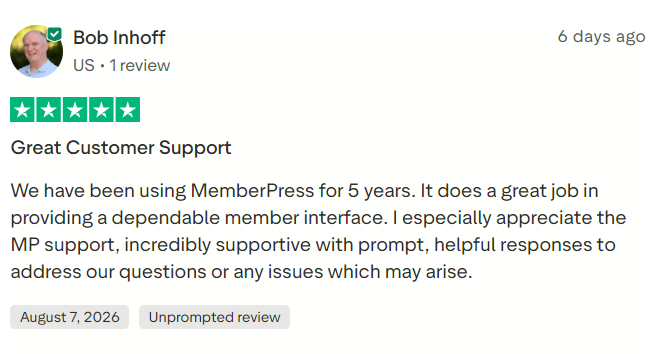
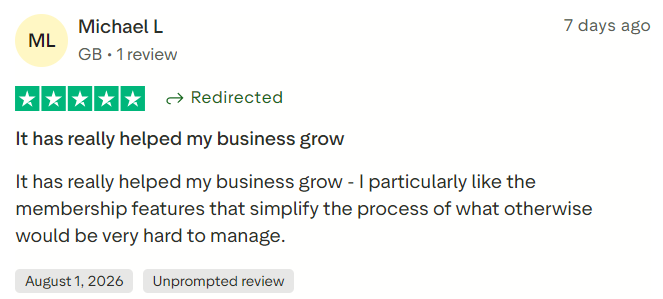
Customer feedback is generally positive, with users frequently highlighting the flexible access rules, extensive functionality, WordPress integration, and helpful support. Criticism commonly focuses on renewal pricing, technical troubleshooting, design customization, and the need to manage a complete WordPress website.
MemberPress currently displays ratings of 4.8 out of 5 on Capterra, 4.7 on G2, and 4.8 on Trustpilot on its own website. Because ratings and review totals change, buyers should consult the live Capterra MemberPress reviews and G2 MemberPress reviews rather than treating any quoted figure as permanent.
#1.
#2.
#3.

MemberPress Pros and Cons
Pros
MemberPress gives businesses extensive control over membership content, customer data, branding, pricing, and website functionality. It supports unlimited memberships and members, provides flexible access rules, and combines subscription billing with courses, communities, and coaching. Growth and Scale do not impose a MemberPress percentage fee, and the broader WordPress ecosystem offers considerable room for customization.
The platform is especially valuable for existing WordPress sites because premium articles, courses, downloads, podcasts, and community areas can be protected without moving the business to a separate service.
Cons
MemberPress requires a self-hosted WordPress website and ongoing technical maintenance. Its annual renewal prices are substantially higher than its advertised introductory rates, while Launch charges an additional 4.9% transaction fee. Several important functions—including content dripping, quizzes, certificates, communities, coaching, and broader payment options—require Growth or Scale.
Member-facing design may also require customization, and combining numerous plugins can lead to performance or compatibility issues. MemberPress is therefore less suitable for users who want hosting, website administration, email marketing, and technical maintenance handled by one provider.
Is MemberPress Worth It?
MemberPress is worth considering for businesses that want to own and control a WordPress-based membership platform. Its access rules are powerful, and the addition of courses, CoachKit, and ClubSuite means that one plugin can now support a broad membership ecosystem.
Growth provides the most balanced proposition for many established creators. It eliminates the 4.9% platform fee and includes the advanced course, coaching, community, payment, and marketing features most professional membership businesses are likely to need.
Launch can work for testing a new idea, but its transaction fee makes it less attractive once revenue begins to grow. Scale becomes worthwhile when a business needs corporate accounts, affiliate management, API automation, direct messaging, advanced file protection, or Authorize.net.
Final Verdict
MemberPress is a capable and highly flexible WordPress membership platform. Its main strengths are sophisticated content protection, ownership of the website and customer data, unlimited membership structures, and the ability to combine subscriptions with courses, coaching, communities, and corporate access.
Its primary drawbacks are WordPress maintenance, promotional first-year pricing, higher renewal costs, and the 4.9% fee attached to Launch. It is not the simplest solution for a complete beginner, but it is one of the stronger choices for creators and organizations that value customization and long-term platform control.
