


Building an online community used to mean starting a Facebook Group and hoping your members could find the important post between advertisements, political arguments, and photographs of somebody’s lunch.
The more professional alternative was usually Slack or Discord. Both are capable communication tools, but neither was originally designed to run a paid membership, deliver a structured course or host a creator’s entire digital business. Slack treats valuable discussions like rapidly expiring office chatter, while Discord can make a respectable coaching program look as though it has been organized inside a video-game lobby.
Circle.so offers a more deliberate alternative. It combines discussions, courses, events, live streams, chat, memberships, payments and community management under one brand.
My overall assessment is positive. Circle is one of the strongest community-first platforms available, particularly for coaches, educators and membership businesses that consider member interaction central to the product.
It is polished, flexible, and easier to organize than most social-media groups. However, it is not cheap. Circle charges subscription fees starting at $89 per month, adds platform transaction fees to payments, and reserves important automation and branding capabilities for higher plans. Email marketing is also a separate paid add-on.
Bonus Free Guide Included
What Is Circle?
Circle is an online community platform founded in 2019. It helps creators, educators, coaches, and organizations build private or public digital communities under their own branding.
A Circle community can contain:
- Discussion forums
- Real-time chat spaces
- Courses
- Membership levels
- Live streams
- Group video rooms
- Events
- Member profiles
- Direct messages
- Resource libraries
- Paid content
- Automated workflows
- AI-powered tools
- Gamification
- Email broadcasts and campaigns
- Mobile and desktop access
The platform is used by independent creators as well as larger organizations. Circle says more than 18,000 community builders use its service.
The important word is “community.” Circle can host courses, collect payments and publish landing pages, but its core purpose is to create an organized place where members interact with the host and one another.
If you simply want to upload 40 videos and sell a self-paced course, a traditional learning-management platform may be a better fit. If you want students to discuss those videos, attend live calls, share work, ask questions and remain connected after completing the lessons, Circle becomes considerably more attractive.
My Circle Review at a Glance
Circle is best for businesses in which conversation, accountability and ongoing participation are part of the product.
Its greatest strengths are its clean interface, flexible Spaces system, community-focused courses, native events, live video and polished member experience. It feels like a professional private network rather than a repurposed social-media group.
Its weaknesses are price, transaction fees and feature gating. Professional starts at $89 per month with annual billing, yet Circle still charges a 2% platform fee on transactions. Advanced workflows and removal of Circle branding require the $199-per-month Business plan. Full email marketing costs extra, while branded mobile applications require custom pricing.
I would recommend Circle to an established creator or coach with a clear plan for member engagement and recurring revenue. I would not recommend paying for it merely because “building a community” sounds like something respectable businesses are now expected to do.
A community platform cannot create a community any more than buying a treadmill creates physical fitness. At some point, someone must show up and do the work.
How Circle Works
Circle organizes content and conversations into Spaces. Each Space can serve a different function and have separate access permissions.
For example, a coaching membership might contain:
- A welcome and orientation Space
- A general discussion forum
- A course Space
- A calendar of live sessions
- A private area for premium members
- A wins and accountability Space
- A searchable resource library
- A casual chat area
- An announcements Space
- A private moderator section
Spaces can be placed into groups so members see a clear structure instead of one enormous stream of unrelated posts.
This architecture is one of Circle’s strongest features. It gives community owners considerable control without requiring technical expertise. Different membership levels can receive access to different Spaces, courses and events.
Posts support rich media, including videos, images, files, polls and embedded content. Members can comment, react, mention one another and follow discussions. Chat Spaces provide faster, less formal conversation, while traditional posts preserve useful information more effectively.
The result falls somewhere between a forum, a social network, Slack and a course portal—without fully inheriting the worst habits of any one of them.
Explore The AI-Linked Asset Class Elites are Investing In
Circle Pricing
Circle currently has two standard publicly priced plans and a custom Circle Plus option. The advertised rates assume annual billing.
Professional: $89 per month
The Professional plan includes:
- Unlimited members
- Three administrators
- Ten moderators
- Up to 20 Spaces
- Courses
- Discussions and chat
- Events
- Live streams and live rooms
- A website builder
- Paid memberships
- Gamification
- A custom domain
- Reporting and analytics
- Member profiles and directory
- Weekly community digests
- Custom branding
- 200GB of storage
- Up to 100 live-stream attendees
- Up to 15 participants in live rooms
- A 2% Circle transaction fee
Professional contains enough functionality to run a serious community. The unlimited-member allowance is especially valuable because many platforms raise prices as membership grows.
However, a 20-Space limit can become restrictive when one community contains several programs or membership tiers. Additional Spaces cost extra.
Business: $199 per month
Business includes everything in Professional, plus:
- Workflows and automations
- Up to 30 Spaces
- Five administrators
- Fifteen moderators
- 500GB of storage
- Up to 200 live-stream attendees
- Up to 20 live-room participants
- Custom profile fields
- API access
- Activity scores
- Automated transcriptions
- Branded email notifications
- Removal of Circle branding
- More advanced customization
- A reduced 1% Circle transaction fee
Business is the more practical option for an established paid community. Workflows can automate onboarding, access changes, reminders and member-engagement tasks. The ability to remove Circle branding also matters to businesses selling a premium branded experience.
Still, $199 per month is a substantial commitment. It becomes more expensive once transaction fees and optional email tools are included.
Circle Plus
Circle Plus uses custom pricing and is aimed at larger businesses requiring features such as:
- AI agents and AI workflows
- Custom single sign-on
- Higher limits
- Advanced migration assistance
- Concierge onboarding
- Priority support
- A dedicated customer success manager
- Optional branded iOS and Android applications
- Lower transaction fees
- Included Email Hub capacity
Most individual creators will not need Circle Plus. Organizations requiring a fully branded mobile app, enterprise support or advanced authentication will need to request a quotation.
Circle offers a 14-day free trial without requiring a credit card.
Circle Transaction Fees
Transaction fees are Circle’s most obvious disadvantage. Circle charges a platform fee when creators sell access through its paywalls:
- 2% on Professional
- 1% on Business
- 0.5% on Circle Plus
These charges are applied in addition to Stripe’s payment-processing fees, which commonly begin around 2.9% plus $0.30 for domestic card transactions in the United States. Rates vary by country, card type and payment method.
Suppose a creator earns $10,000 per month through a Circle community. On Professional, Circle’s 2% fee would consume $200 before Stripe’s charges. The annual Circle transaction cost would be $2,400, plus the subscription and payment processing.
On Business, Circle’s 1% share would equal $100 per month or $1,200 annually, again before Stripe.
The percentage sounds modest until the community succeeds. Then the platform receives an increasingly large reward for processing access to a product the creator built, marketed and delivered.
A business earning substantial revenue should compare Circle’s total cost with alternatives that charge higher fixed subscriptions but no platform transaction fee. The cheapest headline plan is not necessarily the cheapest operating model.
Building a Community With Circle
Circle’s community experience is its finest feature. Members receive profiles, direct messaging, notifications, group chat and a searchable directory. Hosts can create public, private and secret Spaces with different posting and access rules.
The interface is clean and relatively easy to understand. It resembles modern productivity software rather than a traditional discussion board built when the internet still made noises during connection.
Community owners can schedule posts, create recurring events, pin important material and use moderation tools. Members can follow topics and receive weekly digests summarizing activity.
Gamification features can award points, display leaderboards and recognize participation. Used carefully, these tools encourage members to contribute. Used carelessly, they encourage adults to post “Great insight!” twelve times because a digital badge is apparently irresistible.
Circle also offers searchable member profiles and directories. This is valuable in professional communities where networking between participants is part of the benefit.
The platform gives hosts the tools to create structure, but the host must still design that structure intelligently. Several public reviews mention that communities can feel awkward to navigate when owners create too many poorly named Spaces. Circle provides the shelves; it cannot prevent someone from arranging the library by emotional intuition.
Circle Courses
Circle includes native course creation on every standard plan. Creators can organize videos, text, downloads and lessons into structured course Spaces. Lessons can be released gradually, and course material can sit directly beside discussion areas, events and member interaction.
This combination is Circle’s central advantage over conventional course platforms. Students do not consume lessons in one system and discuss them in another. The course and its community share the same environment.
Circle works particularly well for:
- Cohort-based courses
- Group-coaching programs
- Masterminds
- Membership academies
- Certification communities
- Professional development programs
- Courses with live office hours
- Programs built around peer accountability
However, Circle is not the most sophisticated learning-management system. Businesses requiring extensive graded quizzes, formal assignments, detailed academic reports, certificates or complex prerequisite paths may prefer a dedicated course platform.
Circle’s course features are good enough for many creator businesses, but the community remains the star. If students are not expected to interact, Circle’s primary advantage goes largely unused.
Live Streams, Rooms and Events
Circle includes native live streaming, group video rooms and event management.
Hosts can schedule events, collect RSVPs, send reminders and run the session without directing members to a separate platform. Recordings can remain inside the community for later viewing.
Professional allows live streams with up to 100 attendees and live rooms with up to 15 participants. Business raises those limits to 200 stream attendees and 20 room participants. Monthly live-hour allowances also apply.
Live streams suit presentations, interviews and workshops where most attendees watch. Live rooms are designed for more interactive sessions in which multiple participants appear on camera.
Native video reduces dependence on Zoom and keeps members within the branded experience. It also removes the familiar ritual of hunting through three emails for a meeting link two minutes before the session starts.
Nevertheless, some customer reviews mention lag, disconnections and screen-sharing difficulties. Hosts running commercially important events should test Circle’s video tools with realistic attendance before cancelling an established video-conferencing subscription.
Paid Memberships and Paywalls
Circle lets creators charge for:
- One-time access
- Monthly memberships
- Annual memberships
- Trials
- Installment plans
- Specific Spaces
- Courses
- Bundled access levels
Payments run through Stripe. Access can be granted or removed based on the member’s subscription, and coupons can support promotional pricing.
The setup is well suited to tiered memberships. A free member might receive the general discussion area, while a paid member gains access to courses and events. A premium customer could receive private coaching Spaces or exclusive sessions.
Business-plan workflows make this system much more powerful. A purchase can trigger a welcome sequence, add a member to selected Spaces and schedule reminders. A cancelled subscription can remove access automatically.
The platform is capable of serving as the operational center of a membership business. The lingering question is cost: Circle takes its percentage on top of Stripe, even after the creator pays the subscription fee.
Circle Email Hub
Circle includes basic community notifications and weekly digests, but full email marketing is provided through Email Hub, a paid add-on.
Email Hub supports:
- Broadcasts
- Lead-capture forms
- Scheduled campaigns
- Automated email sequences
- Contact management
- Segmentation
- Personalization based on member behavior
- Performance analytics
Pricing varies according to contact count. Circle’s pricing page currently illustrates a charge of $99 per month for 10,000 contacts, added to the underlying community plan. The first 30 days are free.
Integrating marketing email with community behavior is valuable. A creator can segment people according to their activity, purchases or participation rather than synchronizing data with an outside email platform.
But the additional fee weakens Circle’s “all-in-one” proposition. A Business customer using Email Hub for 10,000 contacts could pay $298 per month before transaction fees, Stripe charges and other add-ons.
Creators already satisfied with ConvertKit, Mailchimp, ActiveCampaign or another email provider may prefer to keep it and connect through an integration.
Automations and AI
Circle Business includes workflows for automating community administration.
Workflows can:
- Welcome new members
- Grant or remove Space access
- Apply tags
- Send reminders
- Recognize milestones
- Re-engage inactive members
- Perform scheduled actions
- Update member attributes
- Trigger external integrations
These capabilities reduce repetitive administrative work and help create consistent onboarding.
Circle is also investing heavily in artificial intelligence. Current capabilities include writing assistance, summaries, transcriptions and AI credits on standard plans. Higher custom plans add AI agents, moderation, knowledge tools and more advanced AI workflows.
Some owners will find these useful, particularly for summarizing long discussions or answering recurring questions from a community knowledge base.
Others may reasonably wonder whether every gathering of human beings urgently needs a robot wandering around summarizing them. AI should support the community rather than flooding it with generic content that no actual member wanted to read.
Circle’s emphasis on AI has also produced criticism from users who would prefer improvements to core usability and administration. That does not make the AI features worthless, but it is a reminder that product-development excitement does not always match customer priorities.
Limited Access – Join Now!
Mobile and Desktop Apps
Circle provides free iOS, Android and desktop applications. Members can access multiple Circle communities through the standard Circle app and receive notifications on their devices.
The apps make participation more convenient and give Circle an advantage over community products that function poorly outside a browser.
However, the standard mobile application carries Circle’s branding. Businesses wanting their own application name, icon and app-store listing need a custom Circle Plus arrangement.
A branded mobile app can make sense for a large membership with strong recurring revenue. It is unlikely to be economical for a new creator still persuading the first 20 people to join.
Circle Reviews: What Customers Say
Customer feedback varies substantially by review platform.
G2 reports a rating of approximately 4.5 out of 5 across more than 500 reviews. Users frequently praise Circle’s interface, community organization, customization and ease of setup.
Trustpilot presents a more mixed picture. At the time of research, Circle had a 3.6 rating based on 53 reviews. The distribution was polarized: 43% of reviewers awarded five stars, while 34% gave one star.
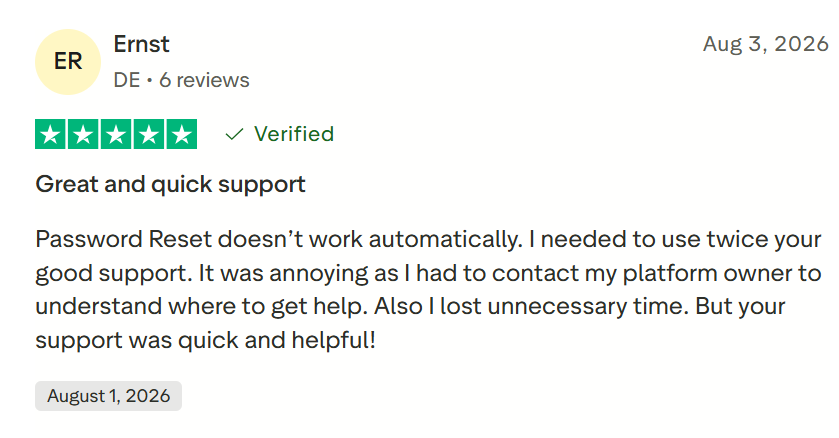
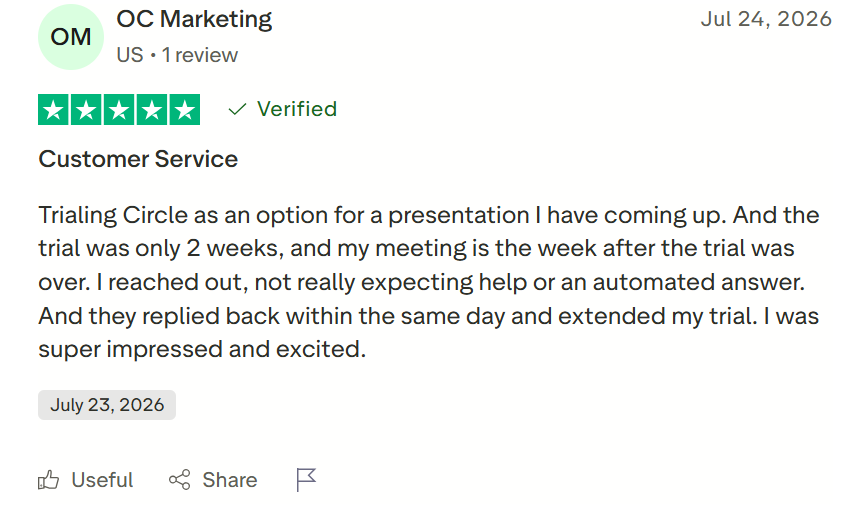
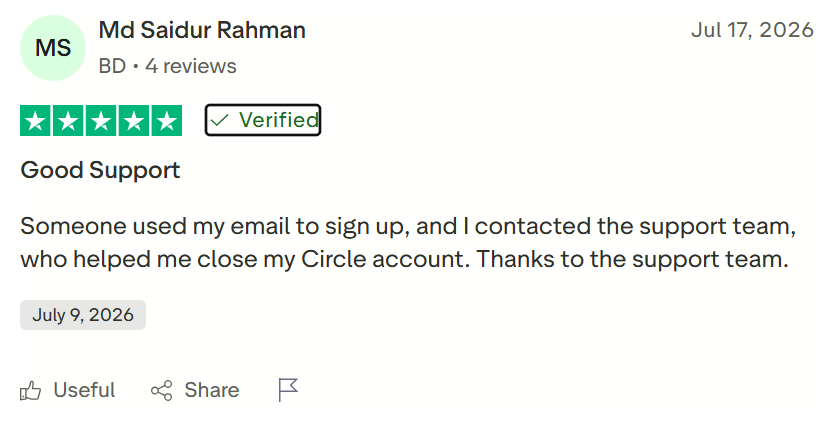
Recent positive reviews commonly praise:
- Responsive and patient support
- A clean community experience
- Suitability for coaching programs
- Helpful problem resolution
- Ease of navigation
- Professional presentation
Critical reviews mention:
- Difficulty cancelling or deleting accounts
- Problems leaving communities
- Lag and video instability
- Confusing administrative controls
- Important features restricted to expensive tiers
- Disappointment with AI features
- Limited language and currency support
The Trustpilot sample is much smaller than the G2 sample, so neither rating should be treated as a perfect measurement. The gap suggests that community owners often appreciate Circle’s capabilities, while certain support, billing and end-user experiences can generate serious frustration.
I would pay particular attention to cancellation authority and account ownership when a company rather than an individual creates the community. The primary account should use a durable business-controlled email address, not the personal inbox of an employee who may eventually leave or become unavailable.
#1.
#2.
#3.
What I Like About Circle
Circle’s strongest qualities include:
- Excellent community organization through Spaces
- Clean, modern member experience
- Unlimited members on standard plans
- Native courses and discussions
- Built-in events and video
- Custom domains
- Paid membership tools
- Strong access controls
- Useful workflows on Business
- Mobile and desktop applications
- Solid integration and API options
- Active product development
- Established user base
- Good support according to many reviewers
The platform feels intentionally designed for communities rather than adapted from workplace chat or social media. That distinction is significant.
What I Do Not Like
My main concerns are:
- High starting price
- Transaction fees on every plan
- Stripe fees charged in addition to Circle’s percentage
- Workflows restricted to Business and above
- Email Hub costs extra
- Removal of Circle branding requires Business
- Space and administrator limits
- Branded apps require custom pricing
- Course features are less advanced than specialist LMS products
- Reports of cancellation and account-deletion friction
- Mixed feedback regarding live-video reliability
- International language and currency limitations
The pricing structure is the largest issue. Circle becomes more expensive as the community earns more, even though the platform already charges a substantial subscription.
Circle Alternatives
Circle’s closest alternatives include Mighty Networks, Skool, Kajabi, Discord, Slack and Facebook Groups.
Mighty Networks offers a similarly community-first product with courses, memberships and branded-app options. Skool is simpler and emphasizes gamification, but provides less customization. Kajabi includes broader marketing, funnels and email functionality, although its community experience is not as deep.
Discord is inexpensive and highly interactive but can feel chaotic and poorly suited to premium professional programs. Slack is familiar to business users but is designed around workplace messaging rather than enduring content, courses and paid memberships. Facebook Groups are easy to join but provide limited control, branding and member ownership.
Circle is usually the strongest choice when professional community design is the priority. Kajabi becomes more attractive when marketing and course selling matter more than member interaction. Skool suits creators who want extreme simplicity.
Who Should Use Circle?
Circle is a good fit for:
- Paid membership communities
- Group-coaching programs
- Cohort-based courses
- Masterminds
- Professional networks
- Creator communities
- Customer communities
- Online academies with strong peer interaction
- Businesses migrating away from Facebook Groups
- Organizations that value branding and structured discussion
It is less suitable for:
- Creators without an existing audience
- Businesses needing only course hosting
- Communities with no monetization plan
- Users seeking a free platform
- Schools requiring advanced academic LMS features
- Businesses highly sensitive to transaction fees
- Owners who want full email marketing included in the base price
- International communities requiring extensive localization
Final Verdict: Is Circle Worth It?
Circle is worth it when community is a meaningful part of what customers are buying. Its polished Spaces, courses, events, profiles, and live features create a professional environment that is significantly better suited to paid programs than Facebook Groups, Slack or Discord. It can bring fragmented discussions, content and events into one coherent member experience.
The platform is not inexpensive. Professional begins at $89 per month, Business costs $199 per month, and Circle charges transaction fees of 2% and 1%, respectively. Email marketing and certain branding capabilities add more cost.
For a community producing reliable recurring revenue, those expenses may be justified by improved organization, engagement, and retention. For an unproven community with no paying members, Circle can become an elegant room in which nobody is standing.
My final rating is 4.2 out of 5. I recommend using the 14-day trial to build a realistic version of the community not merely clicking around an empty account.
Create several Spaces, upload a lesson, schedule an event, invite test members, and examine the experience from both administrator and member perspectives.
Circle provides excellent infrastructure. Whether it becomes a valuable community depends on the people, leadership, and purpose placed inside it.
