

TurboLearn AI is an AI-powered study platform that converts lectures, recordings, videos, PDFs, presentations, websites, and written material into organized notes, summaries, flashcards, quizzes, podcasts, and short lessons. It is intended primarily for students who want to spend less time transcribing information and more time reviewing it.
The company rebranded TurboLearn AI as Turbo AI in 2026. Existing accounts, notes, applications, and subscriptions continued under the new name. This article uses both names because many students still search for the product as TurboLearn AI.
Turbo AI has attracted millions of users and receives strong ratings in the Apple and Google application stores. However, complaints concerning billing, automatic renewals, refunds, failed uploads, and customer support mean students should read the subscription terms carefully before paying.
Bonus Free Guide Included
What Is TurboLearn AI?
TurboLearn AI, now called Turbo AI, is an AI note-taking and study application developed by TurboLearn LLC. It operates through a website and mobile applications for iPhone, iPad, Android devices, and compatible tablets.
Users can record a lecture or upload existing material. The platform processes the source and produces a collection of study resources, potentially including structured notes, a summary, flashcards, practice questions, a podcast, and an AI chat environment.
Although students are the main audience, professionals can also use the platform for meetings, training sessions, research, interviews, and continuing education.
TurboLearn AI Rebranding
TurboLearn AI has officially shortened its name to Turbo AI. The company states that user accounts, stored information, mobile applications, features, and pricing remain connected to the same service.
Older links using the TurboLearn domain redirect to Turbo.ai. The mobile applications may still display TurboLearn or TurboLearn LLC in developer information, subscription descriptions, and previous reviews.
Users should be careful not to confuse the official product with unrelated websites using similar names.
Explore The AI-Linked Asset Class Elites are Investing In
AI Note Generation
The primary Turbo AI feature is automatic note generation. Users can upload or record source material, after which the platform identifies important ideas and organizes them into readable notes.
The company states that its system can preserve mathematical formulas, chemical equations, technical diagrams, and programming code. This may make it useful for subjects such as engineering, computer science, chemistry, physics, medicine, and mathematics.
AI accuracy will vary according to audio quality, speaker clarity, background noise, terminology, document structure, and source complexity. Students should compare generated notes with the original material before relying on them for an examination.
Editable Notes
Turbo AI includes a document-style editor that allows users to revise generated notes. Students can add their own explanations, remove unnecessary material, correct errors, and reorganize the content.
Editing is important because AI-generated notes may misinterpret terminology, omit context, or give too much attention to an unimportant section. Personal revision can also improve learning by requiring the student to process the material rather than passively accepting an automated summary.
Students should treat the generated output as a draft study aid, not as an authoritative replacement for lectures, textbooks, or their own judgment.
Lecture Recording
Turbo AI can record lectures and convert the audio into study material. This allows students to concentrate on the presentation and later review organized notes.
Recording quality depends on the device, distance from the speaker, room acoustics, background noise, and internet or upload reliability. Some application-store reviewers have reported recordings or note-generation jobs becoming stuck or failing to upload.
Students should not depend on Turbo AI as their only copy of an important lecture. When permitted, they should maintain a backup recording or take brief manual notes identifying important concepts and questions.
Recording Permission and Classroom Rules
Students should obtain permission before recording a lecture, class discussion, meeting, interview, or private conversation. Laws governing recordings vary by country and state, and universities may impose rules that are stricter than local law.
Turbo AI’s terms prohibit uploading faculty-generated material without permission. They also prohibit unauthorized sharing of lecture recordings and verbatim transcripts.
Students should check their institution’s policies and obtain consent from lecturers and other participants. Sensitive medical, legal, workplace, or personal conversations should not be uploaded without appropriate authorization.
Flashcards
Turbo AI automatically generates flashcards from the important concepts in a user’s material. Cards can be used for definitions, formulas, dates, terminology, processes, and question-and-answer revision.
The platform advertises spaced repetition, which adapts review sessions to the learner’s performance. Difficult cards can be shown more frequently, while familiar information appears less often.
Automatically generated cards should be reviewed before study begins. A misleading question, overly broad answer, or missing qualification can reinforce incorrect knowledge through repetition.
Practice Quizzes
Turbo AI creates quiz questions from uploaded notes and source material. Users can select topics, adjust difficulty, and generate additional questions for exam preparation.
Quizzes can help learners identify weak areas and practice retrieving information from memory. Detailed answer explanations may also clarify why an answer is correct.
AI-generated questions may occasionally be ambiguous or incorrectly graded. Students should verify disputed answers against reliable course material, especially in subjects where small wording differences are important.
AI Chat
Users can chat with their notes and ask questions about uploaded material. The assistant may explain a concept, compare ideas, produce examples, simplify terminology, or focus on a specific section.
The chat feature can help students explore confusing material without searching through a long recording or PDF. It can also generate potential study questions or alternative explanations.
Because generative AI can produce unsupported or inaccurate statements, users should ask the system to identify the relevant source section and verify important answers independently.
AI Podcasts
Turbo AI can convert source material into an audio study guide or podcast. This allows users to review information while commuting, exercising, or completing other activities.
Audio explanations can benefit learners who prefer listening or want an alternative to rereading notes. However, generated voices and scripts may simplify complicated material or pronounce technical terms incorrectly.
Podcasts should supplement active study rather than replace reading, problem-solving, or retrieval practice.
Bite-Sized Lessons and Microlearning
Turbo AI can transform uploaded material into shorter learning units. These lessons are intended to make long or difficult sources easier to review in small sessions.
Microlearning can be useful for vocabulary, definitions, formulas, processes, and broad conceptual review. It may be less suitable for subjects requiring extended reasoning, essay development, laboratory work, or the completion of complex calculations.
Breaking information into small units can improve convenience but may also remove important context. Learners should periodically return to the full source.
Folders and Organization
Notes can be arranged in folders by class, semester, subject, examination, project, or another category. Material synchronizes between the web platform and mobile applications.
Consistent organization becomes important when a student processes many lectures or documents. Clear folder and note names can prevent revision material from becoming difficult to locate.
Before relying heavily on the platform, users should test whether notes can be exported, copied, downloaded, or preserved in a format that suits their long-term study system.
Mobile and Web Access
Turbo AI is available through web, iOS, iPadOS, Android, and compatible tablet environments. Notes and study resources can synchronize across devices.
The mobile application is useful for recording classes, reviewing flashcards, completing quizzes, and listening to podcasts. The web interface may be more comfortable for editing long notes and working with several documents.
Some user reviews report inconsistencies between mobile and web access or difficulty with recordings when the application is moved to the background. Students should test recording behavior on their own device before using the app for an important lecture.
TurboLearn AI Pricing
Turbo AI’s terms identify Free, Pro, and Unlimited service levels. The company offers monthly and annual subscriptions that renew automatically until canceled.
Publicly advertised headline pricing currently places the main paid Turbo subscription at approximately $20 per month when paid monthly or $10 per month with annual billing, equivalent to about $120 per year.
Apple’s US App Store lists several historical or promotional in-app purchase options, including monthly prices of $14.99 and $19.99 and annual options ranging from $29.99 to $119.99. This variation suggests that prices can depend on promotion, purchase date, platform, region, or account eligibility.
The company does not currently present a clear public comparison containing every Free, Pro, and Unlimited allowance. Buyers should therefore rely on the exact checkout screen shown in their own account rather than assuming that a price or limit seen in an older review will apply.
Free Plan
The Free plan includes access to note generation, flashcards, and quizzes, but it applies usage limits. Public third-party reports commonly identify allowances of around two hours of lecture processing per month and restrictive limits on document uploads and AI interactions.
Because the official website does not publish a complete current allowance table, free users should check the in-app meter before uploading a long lecture or document.
The free level is best used to test note quality, recording reliability, flashcards, quizzes, synchronization, and the editing experience before purchasing a subscription.
Pro and Unlimited Plans
The Terms of Service identify both Pro and Unlimited tiers, but the public website does not clearly document the current differences between them. Paid access may increase recording and upload allowances, AI chat usage, quiz generation, podcast creation, and other advanced capabilities.
Some accounts may receive promotional rates or alternative subscription options. Users should capture a copy of the checkout page showing the plan name, price, term, trial conditions, renewal amount, and included limits before confirming payment.
A student should not assume that a plan labelled “Unlimited” has no technical, fair-use, file-size, or generation restrictions. Any usage essential to the purchase should be confirmed with support.
Trials, Renewals, and Refunds
Turbo AI subscriptions renew automatically at the end of the monthly or annual term. Promotional trials may convert into paid subscriptions unless they are canceled before the conversion date.
The Terms of Service state that fees are generally nonrefundable and noncreditable except where required by law. A limited refund request may be available when an unresolved technical malfunction prevents use of the service.
Subscriptions can be canceled through billing settings or by contacting support. Turbo AI instructs users to cancel at least 24 hours before the end of the billing term to avoid renewal. After cancellation, premium access continues until the current term ends and the account then returns to the Free tier.
Students should set a reminder well before renewal and retain the cancellation confirmation. Purchases made through Apple or Google may need to be managed through the corresponding app-store subscription settings.
Privacy and Data Collection
Turbo AI processes potentially sensitive information, including recordings, uploaded documents, personal data, account information, and generated study content. Users should avoid uploading confidential or personally identifiable material unless they understand how it will be handled.
The Google Play disclosure states that the application may collect personal information, audio, and other data. It also states that data is encrypted in transit and that users can request deletion.
The privacy policy describes access, correction, deletion, portability, and opt-out rights for users covered by applicable state privacy laws. Requests can be submitted through the company’s contact address.
Schools and employers should perform a more extensive privacy and security assessment before encouraging institution-wide use.
Accuracy and Reliability
Turbo AI can save time, but no AI note generator is consistently accurate. Common risks include incorrect transcription, missing definitions, invented connections, oversimplified explanations, and errors in formulas or terminology.
Accuracy can be improved by using clear source audio, separating unrelated materials, reviewing notes promptly, correcting mistakes, and comparing key statements with authoritative sources.
Students should never use Turbo AI output as the sole basis for a medical, legal, financial, engineering, or safety decision.
Academic Integrity
Turbo AI describes its tools as supplements to learning rather than replacements for personal study. Students must comply with examination rules, assignment policies, copyright requirements, and university guidelines.
Submitting AI-generated notes, answers, summaries, or explanations as original coursework may violate academic-integrity rules. Even when AI use is permitted, disclosure or citation may be required.
The safest approach is to use Turbo AI for private revision, organization, and practice unless the instructor has explicitly allowed a broader use.
TurboLearn AI Reviews
Turbo AI has strong application-store ratings. Apple’s US App Store currently displays approximately 4.8 out of 5 from around 33,000 ratings, while Google Play displays approximately 4.7 from hundreds of thousands of reviews.
Positive reviews frequently praise the quality and organization of notes, convenient quizzes, flashcard generation, and the ability to concentrate during lectures.
Negative application-store feedback mentions failed recordings, stuck uploads, synchronization problems, account-access difficulties, restricted free usage, and inconsistent support.
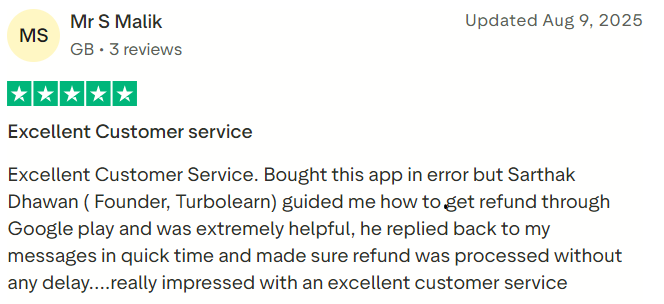
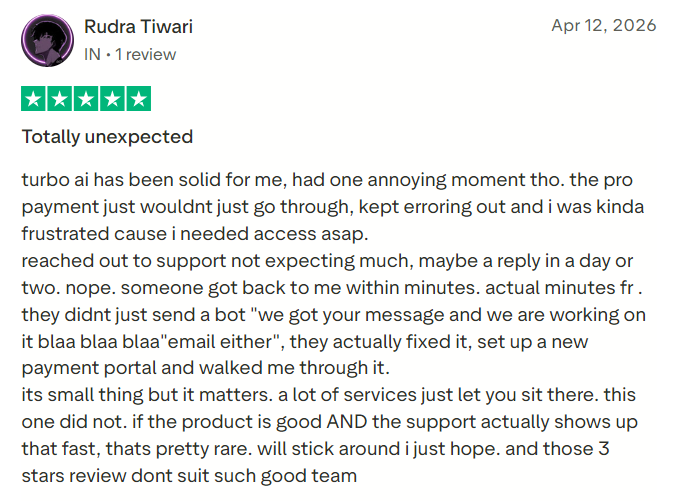
Trustpilot presents a sharply different picture. At the time of research, TurboLearn’s unclaimed profile held a score of approximately 2.3 out of 5 from only 14 reviews. Many complaints concerned automatic renewals, unexpected charges, refunds, and cancellation experiences.
The Trustpilot sample is very small compared with the application stores, but the recurring billing theme is significant enough that buyers should document subscription terms and cancellation carefully.
#1.
#2.
TurboLearn AI Pros and Cons
Pros
Turbo AI accepts lectures, recordings, PDFs, presentations, videos, websites, and written content. It can generate organized notes, flashcards, quizzes, summaries, podcasts, and short lessons from the same source.
Other advantages include an editable document interface, AI chat, STEM formatting, spaced repetition, topic-based quizzes, mobile applications, web access, cross-device synchronization, and a free starting level. Its large application-store review volume provides more evidence of active use than is available for many newer AI study tools.
Cons
AI-generated notes and quiz answers require verification. Recording and upload reliability complaints create a risk when the source cannot be replaced, and the free plan may be too restrictive for regular academic use.
The public pricing page does not clearly compare Free, Pro, and Unlimited allowances. App-store prices vary, subscriptions renew automatically, and the terms generally describe payments as nonrefundable. Trustpilot complaints concerning renewals and refunds also deserve attention.
The platform should not be used to record lecturers, classmates, meetings, or private conversations without permission.
Who Should Use TurboLearn AI?
Turbo AI is most suitable for college and university students managing lecture-heavy subjects, learners who struggle to write notes while listening, students preparing for examinations, and people who benefit from flashcards and practice questions.
It may also help professionals summarize training sessions, educational videos, research material, and nonconfidential meetings.
Users will receive the most value when they actively review and correct the generated material instead of treating the AI output as finished work.
Who Should Avoid TurboLearn AI?
Turbo AI may not suit students who cannot obtain permission to record classes, people dealing with confidential information, users needing guaranteed transcription accuracy, or learners who want transparent fixed usage limits before subscribing.
It may also be unsuitable for students who are uncomfortable with automatically renewing subscriptions or who require immediate telephone support.
Is TurboLearn AI Worth It?
Turbo AI can be worthwhile for students who regularly attend long lectures and use the notes, flashcards, quizzes, and podcasts several times each week. Its main value is turning one source into several study formats without requiring the student to build each resource manually.
The free version should be tested first with representative materials. Students should evaluate note accuracy, recording stability, upload time, quiz quality, mobile synchronization, export options, and support responsiveness.
Before buying, the user should confirm the precise amount charged, the subscription term, renewal price, plan allowances, trial-conversion date, refund conditions, and cancellation method.
Final Verdict
TurboLearn AI, now Turbo AI, is a capable AI study assistant that can transform lectures and documents into useful revision resources. Its notes, flashcards, quizzes, podcasts, AI chat, and mobile access can substantially reduce the administrative work involved in studying.
Its strongest evidence comes from high ratings and large review volumes in the Apple and Google application stores. Its main concerns are AI accuracy, recording reliability, unclear public plan comparisons, and recurring complaints about subscription renewals and refunds.
Turbo AI is best approached as a helpful study companion rather than a replacement for attending class, reading source material, or thinking critically. Students who test the free plan, retain backups, verify important information, obtain recording permission, and manage renewal dates carefully are most likely to benefit from it.
