


Tutor LMS is a WordPress learning-management plugin for creating, managing, and selling online courses. It provides course and quiz builders, assignments, certificates, content dripping, subscriptions, memberships, native ecommerce, instructor dashboards, reporting, and marketplace functionality inside a self-hosted WordPress website.
The free version includes enough functionality to launch a basic education website, while Tutor LMS Pro unlocks advanced teaching, monetization, reporting, and administrative features. Annual and lifetime licenses are available for individual creators, professionals, and agencies.
Bonus Free Guide Included
What Is Tutor LMS?
Tutor LMS is a WordPress LMS plugin developed by Themeum. It allows individuals and organizations to build a learning platform while retaining control of their website, course content, customer records, and branding.
Unlike hosted platforms such as Thinkific and Teachable, Tutor LMS must be installed on a WordPress website. The site owner is responsible for hosting, performance, security, backups, domains, email delivery, and software maintenance.
Tutor LMS 4.0
Tutor LMS 4.0 was released in July 2026 and introduced a redesigned course-building experience, expanded learner and instructor dashboards, improved quizzes, AI-assisted question generation, and broader user-experience improvements.
The updated quiz system provides clearer question management, attempt histories, score breakdowns, and more contextual controls. Learners can see correct, incorrect, and pending answers for previous attempts, while instructors receive more information about course activity and performance.
Tutor LMS 4.0 also introduces dashboard improvements covering course progress, upcoming live lessons, pending tasks, learning time, earnings, reviews, and recent activity.
Explore The AI-Linked Asset Class Elites are Investing In
WordPress Requirements
Tutor LMS operates as a WordPress plugin. The current WordPress.org listing requires WordPress 5.3 or higher and PHP 7.4 or later, although using current supported versions is generally advisable.
The platform’s performance will depend on the quality of these components. A large course marketplace with many videos, instructors, simultaneous users, and database transactions requires substantially stronger hosting than a small course website.
Course Builder
Tutor LMS provides an intuitive course builder for organizing material into topics, lessons, quizzes, and assignments. Users can create unlimited courses and lessons through both the free and Pro versions.
Administrators can add descriptions, difficulty levels, estimated durations, requirements, target audiences, featured images, and introductory videos.
The builder is suitable for creators without coding experience, although advanced website design and integration work may still require WordPress knowledge.
Frontend Course Creation
Tutor LMS provides frontend course-creation tools so instructors do not need unrestricted access to the WordPress administration area.
Instructors can create courses, add lessons, prepare quizzes, manage assignments, review students, and monitor earnings through a branded frontend dashboard.
Frontend course management is particularly valuable for marketplaces, training organizations, and schools working with several instructors. Administrators can review course submissions and control what instructors are permitted to publish.
AI Studio
Tutor LMS Pro includes AI Studio, which can assist instructors with course creation. The tools can generate course structures, lessons, quizzes, assignments, and related educational material.
AI-powered quiz generation allows instructors to choose a topic, question types, difficulty, and the desired number of questions. Supported generated formats include true-or-false, multiple-choice, short-answer, and open-ended questions.
AI Studio requires the customer to supply an OpenAI API key. API usage is billed separately by OpenAI and is not included in the Tutor LMS license. Administrators should establish usage limits and review every AI-generated item before publication.
Lessons and Multimedia
Tutor LMS supports several video-delivery methods, including self-hosted files, YouTube, Vimeo, and embedded video. Creators can also provide text, images, downloads, and other media.
Although direct video uploads are possible, storing large files on ordinary shared hosting can reduce performance and consume bandwidth. A dedicated video service may offer better playback, privacy controls, captions, analytics, and protection.
Businesses should test lessons on desktop and mobile devices, particularly when using interactive embeds, large presentations, or downloadable files.
Quiz Builder
Tutor LMS includes unlimited quizzes and a flexible quiz builder. Instructors can configure time limits, passing grades, attempt allowances, question order, answer feedback, and other behavior.
The advanced interactive question types can create more engaging assessments than conventional multiple-choice tests.
Quiz information can be imported or exported, while detailed reports help instructors identify weak topics and evaluate class performance.
Question Bank and Content Bank
Tutor LMS provides content-management tools for reusing questions and educational material. A question or content bank can reduce repetitive work when several courses cover related subjects.
Instructors can build pools of questions and determine how many a learner must answer. Random selection makes it possible to present different quiz combinations to individual students.
Question banks are particularly useful for certification preparation, recurring assessments, and courses with frequent retakes. However, high-stakes examinations may still require proctoring, identity verification, and stronger security controls.
Assignments
The Pro version supports assignments, deadlines, time limits, and multiple submissions. Students can submit work for instructors to review and grade.
Instructors can provide feedback and use assignments as part of course-completion requirements. Organizations should test accepted file formats, maximum upload sizes, resubmission behavior, and grading workflows.
Gradebook
Tutor LMS Pro includes gradebook functionality for consolidating quiz, assignment, and course performance. Administrators and instructors can use it to monitor individual learners and broader class outcomes.
Custom grading scales can be created to reflect percentages, letter grades, pass-or-fail rules, or another system.
The gradebook is useful for training centers and structured education programs. Institutions needing transcripts, credits, semesters, attendance records, and student-information-system integration may require additional software.
Certificates
Tutor LMS provides a drag-and-drop certificate builder with templates and customizable elements. Creators can modify colors, logos, signatures, backgrounds, student details, course information, and completion dates.
Certificate verification helps third parties confirm whether a learner genuinely earned a certificate. Students can also share certificates through social platforms.
The provider remains responsible for any claims of accreditation or professional recognition. A certificate created by Tutor LMS is not automatically accepted by a licensing authority or employer.
Prerequisites
Course prerequisites allow administrators to require completion of another course or activity before enrollment or progression.
This functionality can be used to create structured learning paths. A professional academy might require foundation training before an advanced certification, while an employer could require orientation before role-specific instruction.
Organizations needing complex competency frameworks or automatically assigned role-based learning may require further customization.
Course Bundles
Tutor LMS supports course bundles that package several courses into one offer. Bundles can be sold through one-time payments or, with an appropriate subscription system, recurring plans.
Bundles are useful for certification pathways, subject collections, membership libraries, career programs, and tiered training packages.
Administrators can establish expiry conditions and control which courses are included. They should also test how access changes when a course is added to or removed from an existing bundle.
Gift Courses
The gift-course feature allows a customer to purchase access for another person. This can be useful for professional development, hobbies, language learning, wellness programs, and employee education.
Businesses should test recipient onboarding, account creation, redemption, expiration, refunds, and tax treatment before promoting course gifting.
Native Ecommerce
Tutor LMS now includes a native ecommerce system, reducing the need to install WooCommerce for straightforward course sales.
The integrated approach can improve performance and simplify administration. Businesses already using WooCommerce can continue using the WooCommerce integration instead.
Payment Gateways
Tutor LMS documents support for payment gateways including Stripe, PayPal, Authorize.net, Paddle, Mollie, Razorpay, and other services, depending on the selected ecommerce arrangement.
Payment-processing charges are imposed by the gateway. Tutor LMS states that it does not take a percentage of course revenue.
Sellers should verify supported countries, currencies, recurring payments, taxes, payout schedules, refund handling, chargebacks, and payment-method availability before selecting a gateway.
WooCommerce Integration
Tutor LMS can use WooCommerce as its ecommerce engine. A course is connected with a WooCommerce product, and purchasing the product enrolls the customer.
WooCommerce provides access to numerous payment gateways, tax services, subscriptions, invoicing tools, checkout extensions, and accounting integrations.
This flexibility can also increase cost and complexity. WooCommerce Subscriptions and many advanced extensions are sold separately. Changes between monetization systems must be handled carefully because course pricing and access settings may be affected.
Subscriptions
Tutor LMS Pro provides native subscriptions for charging learners at recurring intervals. Creators can establish subscription periods and prices according to their business model.
Subscriptions can be used for ongoing academies, course libraries, coaching programs, continuing education, and regularly updated training.
Administrators should test failed-payment recovery, cancellations, renewals, access expiration, refunds, plan changes, and payment-gateway compatibility before launching.
WooCommerce Subscriptions is another option when the business already relies on WooCommerce, but it requires a separate paid extension.
Memberships
Tutor LMS Pro supports sitewide and category-specific memberships. A sitewide plan can provide access to a broad course catalog, while a category plan can restrict access to courses within a particular subject area.
Memberships can support monthly or annual learning libraries, professional academies, customer education, and association training.
Tutor LMS also integrates with products such as Paid Memberships Pro and Restrict Content Pro. These third-party plugins may require separate purchases and introduce additional settings.
Multi-Instructor Course Marketplaces
Tutor LMS is particularly well suited to multi-instructor marketplaces. Administrators can allow educators to register, submit courses, manage students, and monitor earnings.
Instructors may receive payments through bank transfer, PayPal, eCheck, or another configured method. The marketplace operator remains responsible for tax documentation, identity verification, refunds, fraud, and disputes.
Instructor and Student Dashboards
Tutor LMS provides separate frontend dashboards for students and instructors. Students can access enrolled courses, quizzes, assignments, orders, wishlists, reviews, and account settings.
Instructor dashboards can display earnings, active courses, recent learner activity, reviews, student numbers, and performance information.
Tutor LMS 4.0 also allows people who are both learners and instructors to switch between views without exposing irrelevant controls.
Email Marketing and Notifications
Tutor LMS can send automated notifications for enrollment, course completion, quizzes, assignments, purchases, instructor activity, and other events. Pro also provides greater control over email templates and triggers.
The system is useful for operational communication but is not a complete marketing-automation platform. Businesses may still need Mailchimp, Kit, ActiveCampaign, FluentCRM, Groundhogg, or another service for segmentation, lead nurturing, and promotional campaigns.
WordPress websites should also use a reliable transactional-email provider. Depending only on basic server mail can result in messages being delayed or filtered as spam.
Live Classes
Tutor LMS integrates with Zoom and Google Meet for virtual classes, coaching, workshops, and webinars. Instructors can schedule sessions and make meeting information available to enrolled learners.
Google Classroom integration can synchronize students and import announcements about assignments, quizzes, and shared resources.
The videoconferencing or classroom service may have its own subscription, participant limits, storage rules, and privacy requirements.
Page-Builder Compatibility
Tutor LMS works with WordPress themes and page builders such as Elementor, Divi, and Oxygen. Dedicated modules and add-ons can help creators design course-related pages without coding.
A compatible theme can improve the visual consistency of course archives, checkout pages, dashboards, and individual lessons.
Extensive page-builder customization can affect performance. Creators should test logged-in learner pages and avoid loading unnecessary scripts throughout the entire website.
Mobile Experience
Tutor LMS provides a responsive, app-like learner experience with modern, kids, light, dark, and high-contrast presentation options.
Learners can access courses through a mobile browser. The platform also offers application-related functionality, but businesses requiring a fully branded native app should verify current packaging, publication arrangements, and additional costs.
Mobile testing should include video playback, quizzes, assignments, downloads, checkout, login, and dashboard navigation.
Content Protection and Security
Tutor LMS provides controls such as course-content protection, copy protection, hotlink prevention, active-session management, email verification, two-factor authentication, honeypots, and reCAPTCHA integration.
These features can reduce unauthorized access but cannot completely prevent copying, screen recording, account sharing, or piracy.
Because Tutor LMS is self-hosted, website security remains the owner’s responsibility. WordPress, themes, plugins, PHP, and server software must be updated regularly.
Tutor LMS Free
Tutor LMS Free is available permanently through WordPress.org. It supports unlimited courses, learners, instructors, lessons, and basic quizzes.
The free version can be used to build a basic academy and test the course, instructor, and student experience. However, advanced assessments, certificates, content dripping, assignments, reporting, subscriptions, memberships, and other commercial functions may require Pro. The free plugin currently has more than 100,000 active WordPress installations.
Tutor LMS Pricing
Tutor LMS Pro is available through annual subscriptions and lifetime licenses. The Individual license costs $199 per year or $499 as a one-time payment and supports one website. Business costs $399 annually or $999 for lifetime access and can be used on up to 10 websites.
The Agency license costs $799 per year with unlimited website installations, while its $1,999 lifetime option supports up to 50 sites. Every Pro license includes unlimited courses and users, Pro themes, AI Studio, Pro add-ons, priority support, and updates for the applicable license term.
AI Studio requires the customer to supply an OpenAI API key, and related API charges are separate. Prices exclude VAT and other applicable taxes, while purchases are covered by a 30-day money-back guarantee subject to Tutor LMS’s refund policy.
Ease of Use
Tutor LMS provides a comparatively approachable interface for a WordPress LMS. Its frontend builder and dashboards reduce the need for instructors to work inside the WordPress administration area.
The entire system can still be complex because course delivery, ecommerce, payments, email, hosting, and WordPress maintenance must work together. Administrators should test the complete purchase and enrollment journey before accepting customers.
A staging website is advisable for plugin updates and major configuration changes.
Reviews and Reputation
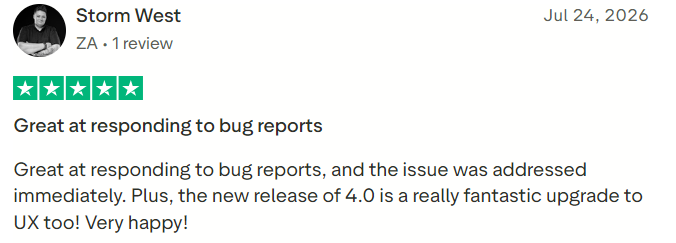
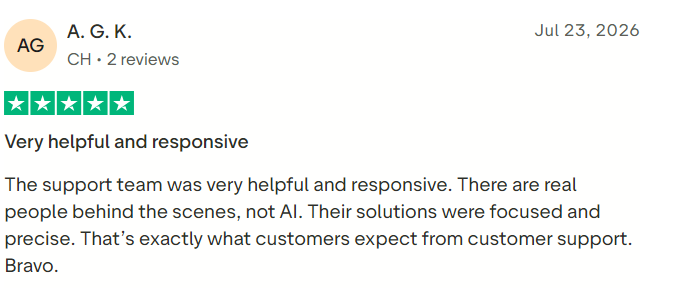
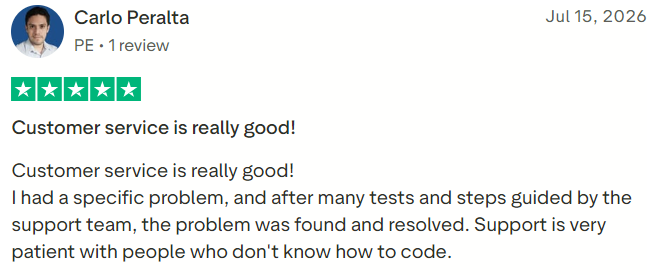
Tutor LMS currently has an average WordPress.org rating of approximately 4.4 out of 5 and more than 100,000 active installations. The company’s pricing page also reports a G2 rating of 4.7 and a Trustpilot rating of 4.8, although scores and review volumes change over time.
Positive reviews frequently mention the modern interface, course builder, extensive feature set, marketplace functionality, and responsive support. Reported criticisms include bugs after updates, support experiences, plugin conflicts, translation issues, and differences between Free and Pro features. Users should read recent reviews that relate to the current 4.0 release because older feedback may describe a substantially different interface.
#1.
#2.
#3.
Who Should Use Tutor LMS?
Tutor LMS is best suited to individual educators, WordPress course creators, coaching businesses, training centers, professional academies, nonprofits, schools, development agencies, and multi-instructor marketplaces.
It is particularly attractive to businesses expecting large numbers of students because the software does not impose a conventional per-student subscription charge.
Who Should Consider Another Platform?
Tutor LMS may not be appropriate for people who do not want to manage WordPress, businesses requiring a turnkey hosted service, organizations needing advanced SCORM or xAPI support, or creators requiring a polished native mobile application without additional configuration.
Companies with strict compliance, security, support, and service-level requirements should compare it with corporate learning-management systems.
Is Tutor LMS Worth It?
Tutor LMS is worth considering for WordPress users who want a modern LMS with strong course, quiz, ecommerce, membership, and marketplace functionality.
The Free version provides a practical way to test the system. Individual Pro is appropriate for most single-site creators, while the Business and Agency licenses are intended primarily for professionals managing several installations.
The lifetime option can provide long-term value, but buyers should first confirm that Tutor LMS satisfies their requirements and works reliably with their hosting, theme, payment gateways, and other plugins.
Final Verdict
Tutor LMS is one of the most comprehensive WordPress learning-management plugins available. Its combination of unlimited courses and users, advanced quizzes, assignments, certificates, native ecommerce, memberships, subscriptions, AI tools, and multi-instructor functionality makes it suitable for many types of education businesses.
Its greatest strengths are flexibility, ownership, and the availability of a capable free version. Its principal disadvantages are the technical responsibilities associated with WordPress and the additional cost of hosting, video, payment processing, AI usage, and third-party extensions.
Prospective customers should build a pilot site, create a representative course, complete a test purchase, configure email delivery, test mobile access, and confirm performance before purchasing a lifetime license. For organizations comfortable managing WordPress, Tutor LMS provides a powerful and scalable foundation for an online academy.
