

WebinarJam is a browser-based webinar platform designed for live presentations, product demonstrations, online training, course launches, coaching events, and sales webinars. It combines webinar broadcasting with registration pages, email and text reminders, audience-engagement tools, sales offers, recordings, replays, and marketing integrations.
Unlike general video-meeting products, WebinarJam focuses heavily on lead generation and sales. Its tools help businesses attract registrations, encourage people to attend, present an offer during the broadcast, and follow up with attendees afterward. According to the official WebinarJam website, the platform has been used by more than 75,000 businesses across 40 industries.
Bonus Free Guide Included
Who Owns WebinarJam?
WebinarJam is operated by Genesis Digital, the software company behind several online marketing products. Its related products include EverWebinar, an automated-webinar platform, and Kartra, an all-in-one marketing and ecommerce system.
The relationship between WebinarJam and EverWebinar is especially important. WebinarJam is primarily designed for live events, while EverWebinar converts recorded presentations into scheduled, evergreen webinars. Customers on qualifying WebinarJam plans currently receive EverWebinar without an additional subscription charge.
How WebinarJam Works
A host begins by creating an event, choosing a schedule, adding presenters, and configuring registration settings. The platform can generate registration, confirmation, live-room, and replay pages, although businesses can also connect external pages and forms.
Registrants receive a unique webinar link and can be sent scheduled reminders before the broadcast. When the event begins, presenters can share their cameras, microphones, screens, slides, prerecorded videos, polls, offers, and other material.
Participants generally join through a web browser without installing a dedicated desktop application. During the event, they can watch the presentation, participate in chat, answer polls, submit questions, and respond to offers. Afterward, WebinarJam can make a recording available as a replay and send follow-up communications based on attendee behavior.
Explore The AI-Linked Asset Class Elites are Investing In
Live Webinar Broadcasting
WebinarJam supports live presentations with multiple hosts and potentially thousands of attendees, depending on the subscription. Its current plans accommodate between 100 and 5,000 attendees per webinar and allow between one and six hosts.
The platform can be used for educational presentations, demonstrations, interviews, virtual conferences, course launches, coaching sessions, employee training, lead-generation events, and live sales presentations. Attendees can participate from computers and compatible mobile devices.
WebinarJam emphasizes one-click browser access, which reduces the friction associated with downloading and configuring meeting software. Nevertheless, hosts still need a reliable computer, a good microphone, a stable internet connection, and sufficient upload capacity. WebinarJam recommends a modern processor, at least 8 GB of memory, a wired connection when possible, and an upload speed of at least 5 Mbps under load.
Webinar Scheduling
Hosts can schedule a single event, create a series, or establish recurring sessions. Flexible scheduling helps businesses offer the same presentation at different times or organize a continuing program.
The system can automatically display webinar times according to a registrant’s location, reducing confusion for international audiences. Calendar links can also be included in confirmation and reminder messages.
Webinar duration depends on the selected plan. Starter permits events lasting up to one hour, Basic allows two hours, Professional allows three hours, and Enterprise permits four hours. A business that requires a longer workshop must divide it into separate sessions or consider another platform.
Registration Pages
WebinarJam includes a point-and-click page builder with templates for collecting registrations. Administrators can customize text, colors, branding, images, logos, videos, forms, and other page elements.
Registration forms can include custom fields to collect information beyond a visitor’s name and email address. This may help a business ask about company size, professional role, interests, experience, or the problem the attendee wants to solve.
The platform also supports A/B testing. A host can compare two registration-page designs and determine which version generates more signups. Businesses with an established website or funnel can embed registration forms externally or connect their own registration and confirmation pages. WebinarJam’s support documentation covers embedded registration, external confirmation pages, custom fields, double opt-in, one-click registration, and split testing.
Email and SMS Reminders
WebinarJam contains a notification system for confirmation messages, attendance reminders, replay announcements, and follow-up emails. Messages can be personalized with shortcodes that insert details such as the registrant’s name, event time, or access link.
Reminders can be scheduled at different intervals before the presentation. The system also documents SMS and voice-call reminders, although availability, pricing, integration requirements, and regulatory obligations should be verified before relying on these communication methods.
Businesses can send notifications using WebinarJam Mail, an external autoresponder, or an SMTP service. External email software may be preferable for companies that need detailed segmentation, lead scoring, sophisticated testing, or multichannel automation.
Email delivery still depends on domain authentication, sender reputation, message content, and recipient filtering. Hosts should test confirmation and reminder sequences before promoting a major event.
Audience Engagement
WebinarJam offers live chat, polls, surveys, presentation slides, video injections, an on-screen whiteboard, attendee spotlighting, and request-to-speak functionality. These features can make a presentation more interactive than a prerecorded video.
Polls can be used to measure audience knowledge, collect opinions, segment potential buyers, or decide which topic to address next. Surveys can gather more detailed information before or after the session.
The attendee spotlight feature allows a host to bring a participant into the presentation. That person may be permitted to speak, share a camera, or contribute to the discussion before returning to attendee status. This is useful for coaching demonstrations, interviews, testimonials, question-and-answer sessions, and interactive training.
Hosts can also use a bad-word filter and moderation controls to manage disruptive comments. Larger broadcasts should still have a dedicated moderator because one presenter may struggle to teach, monitor chat, answer questions, and manage offers simultaneously.
Screen Sharing, Slides, and Video Injections
Presenters can share their screens to demonstrate software, review documents, teach from slides, or show a live workflow. WebinarJam also supports slide presentations and an on-screen whiteboard for visual explanation.
Video injections allow the presenter to play prerecorded material during a live session. This can improve production quality because demonstrations, testimonials, advertisements, or teaching segments can be prepared in advance.
A webinar may therefore combine live introductions and question-and-answer periods with prerecorded core material. This hybrid approach can reduce presenter fatigue while preserving real-time interaction. It is distinct from a fully automated webinar, where the entire session runs according to a predetermined schedule.
Live Offers and Webinar Sales
One of WebinarJam’s most recognizable features is the ability to display an offer during a presentation. The host can introduce a product, course, consultation, membership, or service and show a clickable call to action inside the webinar room.
Offers can include images, descriptions, prices, buttons, and urgency elements. A presenter might display the offer after teaching the main content, during a demonstration, or while answering questions.
The platform also supports sales tracking, helping marketers connect webinar activity with resulting purchases. However, WebinarJam is not a complete ecommerce system. Businesses will generally need an external checkout, payment processor, course platform, shopping cart, or sales-funnel product to complete and fulfill the transaction.
The offer feature should therefore be viewed as a webinar conversion tool rather than a complete payment and product-delivery system.
Paid Webinar Registration
WebinarJam can also be used for events that charge an admission fee. Its documentation includes paid registration and PayPal-based payment workflows.
Paid access can be useful for workshops, masterclasses, professional training, virtual conferences, and continuing-education events. Businesses should confirm how refunds, taxes, payment confirmation, failed transactions, and customer access are handled before opening registration.
Organizations that already use a shopping cart may prefer to process payment externally and register successful buyers through an automation or integration.
Webinar Recordings and Replays
WebinarJam can record live sessions and provide a replay after the event. The host can control whether a replay is available and use follow-up messages to direct registrants to it.
Replays extend the value of a live broadcast by reaching people who registered but could not attend. They can also be sent to participants who want to review the material or revisit an offer.
Webinar logs and analytics can help the host distinguish between live attendees, replay viewers, and people who registered but never watched. Different follow-up messages can then be created for each group.
A replay is not necessarily a permanent video-hosting library. Businesses that want to build a course, membership, or large archive may still need a learning-management or video-hosting platform.
Automated Webinars and EverWebinar
WebinarJam is primarily the live-broadcasting product, while EverWebinar is intended for automated and evergreen events. A successful WebinarJam recording can be moved into EverWebinar and scheduled to run repeatedly.
EverWebinar can simulate a scheduled event using prerecorded video, timed interactions, offers, and automated communications. This is useful for businesses that want a proven presentation to generate leads or sales without requiring the host to appear live every time.
The current pricing page states that EverWebinar is included with the Basic, Professional, and Enterprise packages at no additional cost. Starter customers should confirm the current automation entitlement because the plan comparison contains potentially confusing references to automated webinars while separately stating that the companion EverWebinar product is included beginning with Basic.
The Panic Button
WebinarJam includes a panic button intended to help a presenter recover from a serious technical problem. If a live room experiences a disruption, the feature can create a replacement session and redirect presenters and attendees.
This does not eliminate the need for preparation. Hosts should still test their camera, microphone, browser, internet connection, slides, videos, offers, and presenter links before the event.
For commercially important webinars, a backup computer, alternate internet connection, duplicate presentation files, and separate moderator remain advisable.
Always-On Rooms
An always-on room provides a reusable access location instead of requiring the host to generate a completely new room for every event. This can be convenient for recurring coaching sessions, product demonstrations, weekly classes, or internal training.
The feature may reduce administrative work, but registration, tracking, and communication requirements should determine whether a reusable room or a separate event is more appropriate. Individual events often provide cleaner analytics and more precise automation.
Broadcasting to Social Platforms
WebinarJam documents broadcasting to Facebook and YouTube. This can expand the reach of an event beyond the people who enter the WebinarJam room.
Social simulcasting introduces tradeoffs. Viewers on an external platform may not see the same offers, polls, forms, or calls to action as attendees in the native room. Their engagement and contact details may also be more difficult to track.
Businesses using webinars for lead generation may therefore prefer to direct viewers into the WebinarJam registration process rather than placing the entire presentation on an open social channel.
Webinar Analytics
WebinarJam records information about registrations, attendance, watch time, replay viewing, audience behavior, and sales activity. Administrators can examine session logs and attendee feedback after a webinar.
These reports can help determine how many registrants attended, when viewers left, which offers attracted clicks, and whether people watched the replay. Marketers can use this information to improve the registration page, reminder schedule, opening section, presentation length, offer timing, and follow-up sequence.
WebinarJam also documents UTM tracking, Meta Pixel activity, Google Tag Manager, and webinar-related sales tracking. Companies requiring consolidated attribution across advertising, customer relationship management, ecommerce, and webinar systems may still need a dedicated analytics platform.
WebinarJam Integrations
WebinarJam officially documents integrations with Kartra, ActiveCampaign, AWeber, Keap, iContact, GetResponse, Mailchimp, Ontraport, Kit, Drip, Maropost, Constant Contact, Twilio, Zapier, and external SMTP providers. It also refers to connections with products such as ClickFunnels and Leadpages.
These integrations can add registrants to mailing lists, apply tags, initiate follow-up campaigns, transfer lead information, or connect webinar activity with other business systems. Zapier provides access to additional applications when a direct integration is unavailable.
Businesses should test the exact trigger and action they need. A connection may support new registrations but not detailed information such as attendance duration, poll responses, replay behavior, offer clicks, or purchase data.
WebinarJam Pricing
WebinarJam currently provides Starter, Basic, Professional, and Enterprise subscriptions, with monthly and annual billing. The company also advertises a 14-day trial for $1. Annual billing saves up to 22%, but the annual amount is generally charged as a single payment rather than collected month by month.
Starter costs $49 per month or an effective $39 per month with annual billing. It supports one host, 100 attendees per webinar, and a maximum session length of one hour. The annual cost is approximately $468.
Basic costs $99 per month or an effective $79 per month when billed annually. It supports two hosts, 500 attendees, and sessions lasting up to two hours. The annual cost is approximately $948, and the plan includes EverWebinar according to the current offer.
Professional costs $299 per month or an effective $229 per month with annual billing. It raises the allowance to four hosts, 2,000 attendees, and a maximum duration of three hours. The annual charge is approximately $2,748.
Enterprise costs $499 per month or an effective $379 per month under annual billing. It supports six hosts, 5,000 attendees, and sessions lasting up to four hours. The annual cost is approximately $4,548.
WebinarJam advertises a 30-day money-back guarantee in addition to its trial. Refund eligibility remains subject to the company’s billing policy, so customers should review renewal, cancellation, and refund terms before purchasing.
Additional Costs
The WebinarJam subscription may not represent the complete cost of running a webinar program. Other expenses can include microphones, cameras, lighting, presentation software, external email marketing, SMS or voice services, landing-page software, CRM subscriptions, checkout products, payment processing, video editing, captioning, advertising, copywriting, design, moderators, technical assistance, taxes, refunds, and chargebacks.
Automated webinar users should confirm whether their WebinarJam plan includes EverWebinar. Companies using paid registration must also account for payment-gateway charges and any fees imposed by the checkout system.
Annual billing reduces the effective monthly price but creates a larger upfront commitment. Businesses should compare the annual charge with the number of events they realistically expect to hold.
Customer Reviews
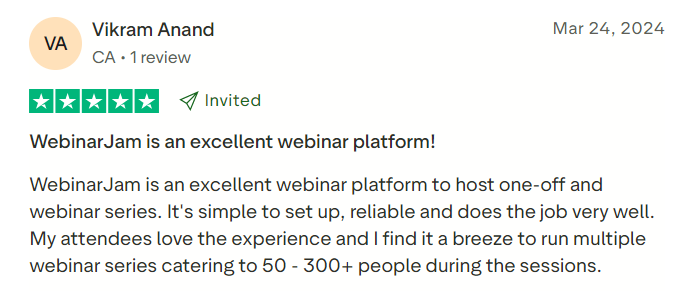
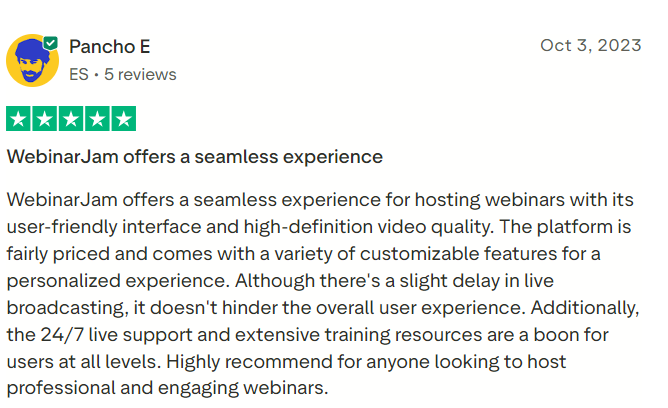
Customer opinion about WebinarJam is mixed but generally positive regarding its marketing functionality. Capterra currently shows an overall rating around 4 out of 5, although the exact score and review count can change as reviews are added. Users frequently appreciate its registration system, interaction tools, offers, reminders, large attendance allowances, and integration with EverWebinar.
Critical reviews commonly mention technical reliability, broadcast delays, support experiences, interface complexity, and annual billing or cancellation concerns. WebinarJam’s large feature set can also require more setup than a basic video-meeting product.
Prospective customers should conduct a complete practice event during the trial rather than judging the product only from its page builder. The test should include registration, emails, presenter access, video injection, screen sharing, chat moderation, offers, recording, replay delivery, and export or integration workflows.
#1.
#2.
WebinarJam Pros
WebinarJam’s principal strength is that it brings most of a webinar marketing funnel into one platform. Registration pages, reminders, live broadcasting, engagement, offers, recordings, replays, split testing, and analytics can be managed without assembling numerous separate tools.
Its attendee limits are also generous. Enterprise supports as many as 5,000 live attendees, while lower plans provide practical options for small and medium-sized presentations. Browser-based access reduces friction for participants, and engagement tools make it suitable for both education and selling.
The inclusion of EverWebinar on Basic and higher plans adds considerable value for businesses that want to convert successful live presentations into automated campaigns.
WebinarJam Cons
WebinarJam is less suitable for ordinary team meetings or highly collaborative workshops. Its interface and workflow are optimized for one-to-many presentations, marketing, and sales rather than daily internal communication.
Session-duration limits can be restrictive for conferences or full-day training. The lowest plan permits only one hour, while even Enterprise is limited to four hours per session.
Some users also report reliability and customer-support concerns. Because technical problems during a live launch can have an immediate financial effect, businesses should rehearse thoroughly and maintain contingency plans.
The platform is not a full course host, community system, CRM, or ecommerce service. Companies may still need several supporting products to manage leads, accept payments, deliver purchases, and maintain long-term customer relationships.
WebinarJam Alternatives
Zoom Webinars may be preferable for businesses that prioritize familiarity, conventional corporate events, and integration with an existing Zoom environment. GoTo Webinar is another established choice for business presentations, employee training, and formal events.
Demio provides a streamlined browser-based experience and may feel easier for teams that do not need WebinarJam’s full set of sales tools. EasyWebinar also combines live and automated events and is relevant for creators building webinar funnels.
Livestorm is well suited to browser-based webinars, product demonstrations, and business events, while BigMarker offers extensive functionality for large virtual conferences and branded event experiences. Crowdcast may be more appropriate for creators seeking a simpler, socially oriented event environment.
EverWebinar is the direct alternative when a business only needs prerecorded, evergreen presentations and does not intend to broadcast live.
Who Should Use WebinarJam?
WebinarJam is best suited to marketers, consultants, coaches, course creators, agencies, software companies, educators, and online businesses that use presentations to attract leads or sell products.
It is particularly valuable when the webinar itself forms part of a structured sales funnel. Registration-page testing, reminder sequences, timed offers, sales tracking, replay follow-up, and EverWebinar integration all support that use case.
Professional and Enterprise can also accommodate large launches, virtual events, and public presentations, provided their duration limits and technical workflow meet the organizer’s needs.
Who Should Avoid WebinarJam?
Businesses that need only occasional small meetings can generally use a simpler and less expensive video-conferencing product. Organizations running full-day conferences may find the session-duration limits inconvenient.
Companies that prioritize sophisticated event networking, exhibitor areas, breakout programs, ticketing, or hybrid venue management should consider a dedicated virtual-event platform. Those needing a complete learning-management system must also combine WebinarJam with course-delivery software.
WebinarJam may not be ideal for users unwilling to test technical settings, rehearse presentations, or manage the operational details of a webinar funnel.
Final Verdict
WebinarJam is a feature-rich webinar platform built for teaching, lead generation, and online selling. Its strongest capabilities include customizable registration pages, reminders, live chat, polls, video injections, presenter controls, sales offers, recordings, replays, analytics, and integration with EverWebinar.
The platform offers considerably more marketing functionality than a standard meeting application. However, its value depends on using those capabilities. A business that runs conversion-focused webinars regularly can justify the subscription more easily than one that hosts a few informal presentations each year.
Before purchasing, prospective customers should confirm attendee requirements, session length, presenter count, automated-webinar access, email integrations, payment workflow, and annual renewal terms. A complete trial event is the most reliable way to determine whether WebinarJam’s workflow and broadcast performance are suitable for the business.
