


MemberSpace is a no-code membership platform that lets creators add memberships, protected content, online courses, and private communities to an existing website. It works with popular website builders such as Squarespace, Wix, Webflow, WordPress, Showit, Duda, Notion, Weebly, and Carrd.
Unlike an all-in-one website platform, MemberSpace does not require creators to rebuild their existing sites. Users install a small code snippet, connect Stripe, create membership plans, and determine which pages or digital resources members can access.
This flexibility makes MemberSpace particularly attractive to creators who are satisfied with their current website but need stronger membership and payment functionality. However, its recurring subscription cost and transaction fees require careful consideration.
Bonus Free Guide Included
What Is MemberSpace?
MemberSpace is membership-management software that can turn an existing website into a gated content platform. It provides member registration, login, payment collection, access control, content organization, and subscription management without requiring the website owner to migrate to a dedicated course or membership service.
MemberSpace can be used to sell membership subscriptions, online courses, coaching resources, premium articles, paid newsletters, private podcasts, video and audio content, downloadable files, content libraries, community access, templates, guides, fitness or wellness programs, professional resources, and other one-time digital products.
The software operates as a layer over an existing website. Public pages remain on the website builder, while MemberSpace handles member accounts, payments, protected content, and access permissions.
How MemberSpace Works
To begin, a creator signs up for MemberSpace and connects an existing website. The platform provides an installation code that is pasted into the website’s global code or settings area. Dedicated installation instructions are available for the major website-building platforms.
The creator can then establish membership plans, connect a Stripe account, upload or organize protected material, and add signup or login links to the website. When a customer registers, MemberSpace creates the account, processes the payment through Stripe, and grants access to the appropriate content.
MemberSpace supports free access, recurring subscriptions, one-time payments, and installment plans. It also provides options for free trials, signup fees, coupons, fixed billing dates, taxes or additional fees, and post-registration redirects.
Explore The AI-Linked Asset Class Elites are Investing In
Website Compatibility
One of MemberSpace’s main advantages is its broad compatibility with different website platforms. It can be installed on Squarespace, Wix, Webflow, WordPress, Showit, Duda, Notion, Weebly, Carrd, and custom-coded websites, allowing creators to add membership functionality without rebuilding their existing sites.
This platform-independent approach allows businesses to change or redesign parts of their websites without necessarily replacing their membership-management system. MemberSpace states that it works with virtually any website capable of accepting its installation code.
However, the quality of the integration can depend on the website builder. Certain platforms provide greater control over custom code, page design, and protected URLs than others. Buyers should test the complete registration, login, payment, and content-access experience during the free trial.
Membership Management
MemberSpace supports unlimited free and paid members and allows creators to establish multiple membership tiers. Different plans can unlock different pages, courses, files, communities, or content spaces.
Available membership options include free memberships, monthly or annual subscriptions, one-time purchases, installment plans, free trials, signup fees, manually approved accounts, and tiered access levels.
Creators can also establish fixed billing dates, offer coupons and promotional discounts, and create plans that expire after a specified period.
Creators can also provide direct signup links for individual offers. This makes it possible to promote different plans through landing pages, email campaigns, social media, or advertising.
Members receive an account area where they can view purchases and manage their information. Administrators can monitor members, subscriptions, plans, and payment activity from the MemberSpace dashboard.
Spaces and Content Libraries
Protected content is organized into areas called Spaces. A Space can contain a course, private community, premium-content collection, resource library, or another group of member-only materials.
Creators can add articles, written posts, PDFs, images, audio files, downloadable resources, embedded videos, external links, lessons, and community discussions. This range of content formats makes it possible to build courses, resource libraries, coaching portals, paid communities, and other membership experiences within MemberSpace.
Spaces can be connected to one or more membership plans, allowing the same content to be sold individually, included in a bundle, or provided to several membership tiers.
Members can search protected material, bookmark resources, and receive notifications when new content becomes available. This makes Spaces more useful than simple page protection for businesses with growing libraries of lessons, videos, or downloads.
The Starter plan supports five Spaces, while Growth includes unlimited Spaces.
Content Protection
MemberSpace can protect existing website pages or content created directly inside the platform. Website owners determine which membership plans can access each protected resource.
MemberSpace also offers options intended to discourage members from sharing protected page links. Nevertheless, no web-based membership platform can completely prevent authorized users from copying, recording, or redistributing material. Creators selling valuable intellectual property may need additional video-hosting, watermarking, or digital-rights-management tools.
Online Courses
MemberSpace can be used to create and sell flexible online courses. Rather than enforcing a rigid course template, it allows creators to organize lessons inside Spaces or protect course pages built with their existing website editor.
Members can search lessons, bookmark material, and receive alerts when new content is published. This approach gives designers considerable control over the appearance of a course because lessons can match the rest of the website.
However, MemberSpace is not a traditional learning-management system. Businesses requiring advanced quizzes, graded assignments, certificates, prerequisites, detailed learner analytics, SCORM support, or compliance training may find a dedicated LMS more appropriate.
Community Features
MemberSpace allows creators to add private discussions directly to their websites. Members can publish posts, reply to other participants, leave comments, and use emoji reactions within protected Spaces.
MemberSpace communities can be organized for paid membership groups, course discussions, coaching cohorts, professional networks, mastermind groups, customer communities, private interest groups, and accountability programs.
This flexibility allows creators and organizations to establish focused spaces where members can exchange ideas, ask questions, share resources, and support one another.
Access can be connected to different membership tiers, enabling creators to maintain separate communities for different products or customer groups. The principal benefit is that discussions remain on the creator’s branded website rather than being moved to Facebook, Slack, or another community provider.
The community system is suitable for straightforward conversations, but organizations needing sophisticated moderation, live events, gamification, complex member directories, or native mobile applications may prefer a specialized community platform.
Payments and Stripe
MemberSpace uses Stripe to process paid memberships. Customers can pay with major credit and debit cards, while Apple Pay and Google Pay are supported when available through the connected Stripe configuration.
Supported selling arrangements include recurring subscriptions, one-time payments, installment plans, and free access. Businesses can also configure trials, coupons, signup charges, and selected billing dates.
Stripe’s normal payment-processing charges apply separately from MemberSpace’s transaction fee. Consequently, sellers must account for both charges when establishing product prices.
PayPal is not presented as a native alternative to Stripe for standard MemberSpace checkout. Businesses whose customers strongly prefer PayPal should consider this limitation before subscribing.
Taxes
MemberSpace lets creators add a tax or fee to a membership plan, but sellers remain responsible for determining appropriate rates and complying with applicable tax laws.
The company’s documentation states that MemberSpace does not support Stripe Tax and recommends that it remain disabled in the connected Stripe account. It also explains that MemberSpace and Stripe transaction fees are calculated using the total amount paid by the customer, including an added tax or fee.
Businesses with complicated sales-tax, VAT, or GST obligations may need professional advice or additional tax software.
Branding and Customization
MemberSpace is designed to keep the member experience connected to the creator’s existing website. Users can customize colors, fonts, buttons, forms, and interface wording to create a more consistent visual identity.
The amount of visual control also depends on the underlying website builder. Advanced designs may require custom CSS or assistance from a designer or developer.
Although MemberSpace can create a relatively integrated experience, parts of the account and payment process are still powered by MemberSpace and Stripe. Buyers seeking complete interface control should test the member journey carefully.
Integrations and Automation
MemberSpace connects with several external products to extend its core functionality. Available integrations include:
- Stripe for payment processing
- Zapier for workflow automation
- Rewardful for affiliate management
- Google social sign-on
- Community Box for member directories
Zapier can connect MemberSpace with email platforms, spreadsheets, customer-relationship systems, and other business applications. Possible automations include adding new customers to an email list, recording purchases, updating a CRM, or notifying a team when a subscription is created.
The Growth plan also provides beta API access for retrieving information about members, plans, and Spaces. This may be useful for businesses building custom reporting or administrative workflows.
The native integration ecosystem is not as extensive as those of mature WordPress plugins or larger all-in-one platforms. Businesses depending on a particular email, tax, affiliate, or analytics system should confirm compatibility before migrating.
Member Migration
MemberSpace offers free migration assistance for existing free and paid members. This may help businesses move from another membership solution without manually recreating every account.
Migration complexity depends on the previous platform, payment processor, subscription structure, and available customer data. Existing Stripe subscriptions may be easier to preserve than subscriptions processed through an entirely different payment provider.
Before migrating to MemberSpace, businesses should confirm whether existing passwords can be transferred or customers will need to reset them, how current Stripe subscriptions and billing dates will be handled, and how membership tiers will be mapped to the new system.
They should also determine whether historical transactions can be imported, what will happen to active coupons and trial periods, and whether customers must take any action during the transition. A test migration should be completed and carefully reviewed before the previous platform is canceled.
MemberSpace Pricing
MemberSpace currently offers two publicly listed plans and a customized option for larger businesses.
Starter
Starter costs an introductory $24 per month when billed annually, equivalent to $288 for the year. The pricing page also displays a regular rate of $39 per month. It charges a 5% MemberSpace transaction fee in addition to Stripe’s payment-processing charges.
Starter includes unlimited members and membership tiers, five member Spaces, one website connection, and access to human support. It is intended for creators launching or operating a relatively simple membership business.
Growth
Growth costs $99 per month when billed annually, equivalent to $1,188 per year. It reduces the MemberSpace transaction fee to 2%.
The plan includes unlimited members, tiers, and Spaces, along with three website connections and beta API access. Members can use the same account across connected websites.
Custom Pricing
Businesses needing lower transaction costs or a more specialized implementation can request custom pricing. MemberSpace advertises a possible 1% transaction fee along with custom reporting, developer assistance, additional website connections, and prioritized feature requests.
MemberSpace also provides a seven-day free trial without requiring a credit card. Prices and promotional offers can change, so buyers should verify the latest details on the official MemberSpace pricing page.
Understanding MemberSpace Transaction Fees
The transaction fee can materially affect the platform’s total cost. It is calculated as a percentage of each paid sale and is separate from Stripe’s processing fee.
For example, a business generating $5,000 per month would pay approximately $250 per month in MemberSpace fees on Starter at 5%, excluding Stripe charges. On Growth, the 2% fee would equal approximately $100 per month, in addition to the higher subscription price.
Using the displayed annual billing rates, Growth costs $75 more per month than Starter but saves three percentage points on transaction fees.
At approximately $2,500 in monthly sales, the reduced transaction fee can offset Growth’s higher subscription price. Above that amount, Growth may cost less overall while also providing unlimited Spaces and additional website connections. This calculation does not include Stripe fees, taxes, refunds, annual-payment timing, or customized offers.
Ease of Use
MemberSpace is generally easier to establish than a custom membership system. The installation snippet, central dashboard, visual customization, and direct Stripe connection make it accessible to creators without substantial programming experience.
Its major usability advantage is that users can retain an existing website. They do not need to learn a new website builder or reconstruct all their public pages.
However, creators must still coordinate two systems: MemberSpace and the original website platform. They may also need separate tools for email marketing, advanced course assessments, tax calculation, video hosting, and analytics.
Customer Support and Reviews
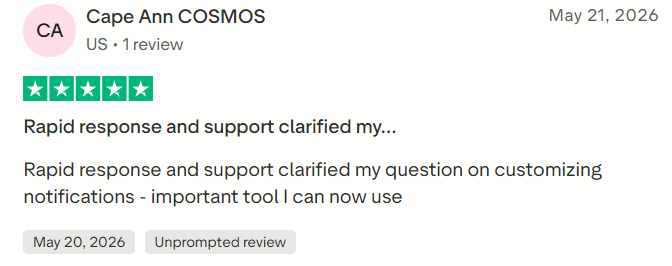
MemberSpace provides email assistance, Zoom support, help documentation, educational videos, and free weekly support sessions. Customer reviews frequently mention responsive and helpful support, straightforward setup, and the ability to add memberships without changing website providers.
The company currently displays ratings of 4.8 out of 5 on Trustpilot, 4.7 on G2, and 4.9 on Capterra. Because ratings and review totals change over time, prospective buyers should check the current G2 MemberSpace reviews and Capterra MemberSpace listing before making a decision.
Common criticisms may include transaction fees, dependence on Stripe, limited advanced LMS functionality, and occasional difficulties coordinating MemberSpace with the underlying website design.
#1.

#2.
#3.

MemberSpace Pros and Cons
Pros
MemberSpace works with many popular website builders and lets creators retain their existing websites. It supports unlimited members and tiers, flexible payment structures, protected pages, content libraries, courses, and private discussions. Setup requires relatively little technical knowledge, and the platform offers direct human support and free member migration.
The member experience can be customized to match the existing brand, while search, bookmarking, and new-content notifications improve the usability of larger content libraries.
Cons
MemberSpace charges a percentage transaction fee on every public plan, in addition to Stripe’s processing charges. Starter limits creators to five Spaces and one connected website, while Growth costs considerably more.
Stripe is the primary payment processor, which may be restrictive for businesses needing PayPal or other regional gateways. MemberSpace also lacks some advanced LMS features, built-in email marketing, sophisticated tax automation, detailed analytics, and the broader integration ecosystems available from larger platforms.
Is MemberSpace Worth It?
MemberSpace is worth considering when a creator already has a well-designed website and wants to add membership functionality without rebuilding it elsewhere. Its compatibility with numerous website platforms, accessible setup process, flexible selling options, and built-in content Spaces make it a practical solution for many small and midsize membership businesses.
Starter can be appropriate for testing an idea or operating a small content library. However, its 5% transaction fee becomes expensive as revenue increases. Growth offers better economics once monthly sales approach the break-even point, while also providing unlimited Spaces, multiple website connections, and API access.
Businesses with substantial revenue should compare the custom plan with competing platforms that charge no percentage fee.
Final Verdict
MemberSpace is a flexible and approachable membership solution for creators who want to monetize an existing website. Its strongest advantages are broad website compatibility, unlimited members and tiers, straightforward Stripe payments, customizable protected Spaces, and responsive support.
Its primary weaknesses are transaction fees, dependence on Stripe, and the absence of advanced learning, marketing, tax, and reporting tools. It works best as a membership layer added to an established website rather than as a complete all-in-one business platform.
