


Uscreen is an all-in-one video membership platform that helps creators and organizations host, distribute, and monetize premium video content. It combines video hosting, subscription management, website creation, livestreaming, marketing tools, analytics, and branded mobile or television applications within one system.
The platform is designed primarily for businesses that want to build a paid video library or streaming service rather than sell a conventional text-based online course. Fitness instructors, educational creators, entertainers, coaches, faith organizations, sports businesses, and media companies are among its principal users.
Uscreen positions itself around three primary use cases: streaming services, membership communities, and digital wellness studios. Uscreen’s official website describes the product as a system that unites video, community, livestreaming, memberships, and branded applications.
Bonus Free Guide Included
How Uscreen Works
A business begins by uploading its video content and organizing it into a searchable catalog. It can then create subscription plans, one-time offers, rentals, bundles, or free-access products. Customers register through the business’s storefront and receive access according to the product or membership they purchased.
Members can watch content through a web browser. Businesses on qualifying plans can also provide branded iOS and Android applications, while custom contracts can include television applications. Payments, viewing activity, subscriptions, and customer information are managed from the Uscreen administration dashboard.
This structure makes Uscreen more than a standalone video host. It is intended to operate as the customer-facing website, video library, payment system, membership manager, engagement platform, and application infrastructure for a video business.
Video Hosting and Content Management
Uscreen includes a video content-management system through which administrators can upload, organize, publish, and monetize videos. Content can be divided into categories, collections, programs, or series, producing an interface similar to that of a commercial streaming service.
Creators can add titles, descriptions, thumbnails, captions, downloadable resources, and supporting information to their videos. Access settings determine whether content is free, included with a subscription, available as a rental, or sold separately.
The same video can be attached to several commercial arrangements. For example, a creator can include it in a recurring membership while simultaneously offering it as a rental, a one-time purchase, or part of a bundle.
This flexibility is useful for businesses serving both regular members and customers who only want access to a particular program or event. Uscreen’s video pricing documentation confirms that individual videos can support multiple access and pricing options at the same time.
Explore The AI-Linked Asset Class Elites are Investing In
Website and Video Catalog
Every Uscreen account includes a hosted storefront where visitors can browse content, review subscription choices, register, and complete purchases. Its catalog-oriented design is especially suitable for businesses with substantial video libraries.
The website tools allow creators to adjust branding, navigation, promotional sections, product pages, and other customer-facing elements without developing a streaming site from the beginning. Growth provides a custom branded domain, while Starter uses a Uscreen-branded domain.
Uscreen is convenient for creators who do not want to assemble WordPress, separate video hosting, membership plugins, checkout software, and account-management tools. However, businesses seeking complete control over every element of their website may find the hosted editor less flexible than a custom-developed site.
Livestreaming
Native livestreaming enables businesses to broadcast classes, events, interviews, workshops, coaching sessions, performances, or announcements directly to members. Viewers can join from compatible devices and participate through live chat when that functionality is available.
A livestream can be free, restricted to subscribers, or sold as a paid event. After a broadcast ends, its recording can be added to the on-demand video library and assigned to a membership, rental, or one-time offer. This helps businesses turn a live event into a reusable product.
Current standard plans include one free livestreaming hour per month. Additional usage is charged at $15 per hour, and Uscreen bills overages in complete one-hour increments. Livestream recordings also count toward the account’s video-storage allowance. Businesses planning frequent live classes should therefore calculate both livestreaming and storage expenses rather than considering only the base subscription.
Community and Member Engagement
Uscreen can combine video content with a private member community. Depending on the plan and features purchased, creators can publish posts, invite discussions, communicate with members, support challenges, and encourage customers to interact with one another.
Advanced engagement functionality can include direct messages, calendars, viewing streaks, achievements, and badges. These tools are particularly relevant to fitness, wellness, coaching, and educational memberships, where continued participation is often more important than a single purchase.
The principal limitation is that the complete community package is not included with every standard subscription. Uscreen’s current pricing page places capabilities such as direct messages, challenges, calendars, streaks, and badges within its Custom offering. A business choosing Uscreen mainly for community should obtain written confirmation of the features included in its proposed plan.
Branded Mobile Applications
App Essentials includes two branded mobile applications covering iOS and Android. This gives customers a dedicated environment in which they can find content, watch videos, receive updates, and interact with the membership from a phone or tablet.
Uscreen handles much of the technical development and ongoing maintenance, meaning the business does not need to employ its own application-development team. App Essentials also provides onboarding and migration assistance for customers, payments, and content.
A branded application can increase convenience and strengthen customer loyalty, especially when members watch content repeatedly. Push notifications can also help creators announce new videos, promote livestreams, remind inactive members, and communicate program updates.
The main disadvantage is cost. App Essentials begins at substantially more than the web-only plans and carries a per-subscriber charge. Businesses must also consider app-store rules, developer accounts, in-app payment policies, and any additional features that are not included in the base package.
Television Applications
Uscreen can deliver content through branded television applications for platforms such as Roku, Apple TV, Fire TV, and Android TV. These applications are most valuable to fitness studios, entertainment companies, sports publishers, and other businesses whose audiences prefer watching longer videos on a television.
The current Custom plan advertises five television applications. Custom pricing means the actual cost depends on the applications, audience size, storage, support, migration, and contractual requirements. A prospective customer should ask whether development, submission, maintenance, updates, and app-store changes are included in the quotation.
Television applications are a major differentiator between Uscreen and course platforms such as Thinkific, Teachable, and Podia. However, they may be unnecessary for businesses whose content consists mainly of written lessons, short coaching resources, or downloadable files.
Monetization Options
Uscreen supports recurring subscriptions as well as one-time sales, rentals, bundles, pay-per-view content, and free access. A company could therefore operate a monthly membership, sell individual workshops, rent special events, and provide selected promotional videos without maintaining several separate systems.
Subscription businesses can offer different membership levels and determine which content belongs to each plan. Coupons and trials can be used to support customer acquisition, while bundles allow several videos, collections, or livestreams to be packaged together.
The platform is particularly well suited to recurring video memberships. Businesses built mainly around occasional low-priced downloads may find its monthly subscription and platform fees comparatively expensive.
Payments and Transaction Fees
The subscription price is not the only cost associated with Uscreen. Standard payment-processing charges apply, and the platform charges fees for certain transactions.
Starter has no recurring subscriber fee, but it carries a 10% fee on one-time sales. Growth charges $1.99 per subscriber per month and a 5% fee on one-time sales. App Essentials and Custom charge $0.99 per subscriber per month, while one-time sales remain subject to a 5% platform fee. Processing and payment-gateway charges are additional.
Uscreen also charges $0.25 per user per month for users added through Group Subscriptions. Chargebacks can produce further costs, and the business remains responsible for the disputed amount. According to the current fee documentation, PayPal through Uscreen and the Uscreen Payments Gateway generally carry a $20 chargeback fee in US dollars.
These costs mean that a plan’s advertised monthly price should not be treated as the complete operating expense. A large membership can accumulate a meaningful monthly subscriber charge even when revenue comes predominantly from recurring payments.
Marketing and Automation
Uscreen includes marketing and automation functionality intended to help businesses acquire members, increase engagement, and reduce cancellations. Creators can use built-in campaigns and customer information to communicate with leads and subscribers.
Automations may support activities such as welcoming a new member, following up with customers, promoting content, addressing failed payments, encouraging inactive members to return, or reminding users about upcoming broadcasts. Push notifications become particularly useful when the business operates branded applications.
The platform can replace several basic marketing tools, but it is not necessarily a complete substitute for an advanced customer relationship management or email-automation system. Organizations needing sophisticated lead scoring, highly detailed segmentation, sales pipelines, or multichannel attribution may still require specialist software.
Analytics and Reporting
Uscreen provides reporting related to sales, subscriptions, customer activity, video consumption, and membership performance. Administrators can examine watch time, popular content, engagement, revenue, customer growth, and retention indicators.
These reports help creators determine which videos attract viewers, where members disengage, and which products contribute the most revenue. Such information can guide decisions about programming, pricing, livestream schedules, and customer-retention campaigns.
Uscreen’s analytics are designed for operating a video membership business, not for replacing a complete business-intelligence platform. Larger organizations may need to export data or use integrations and API access to create custom financial, cohort, or attribution reports.
Integrations and API Access
Uscreen can work with external marketing, analytics, automation, and payment products. Integration availability depends on the plan and contractual arrangement. Custom includes API access and integrations, making it the most suitable option for organizations that need proprietary applications, data synchronization, specialized reporting, or connections with internal systems.
Before subscribing, a business should verify the exact triggers, actions, fields, and data-transfer limits supported by every essential integration. The presence of an integration does not guarantee that it can reproduce an organization’s existing automation or reporting workflow.
Uscreen Pricing
Uscreen currently has four principal subscription levels: Starter, Growth, App Essentials, and Custom. Uscreen’s official pricing page should be consulted before purchasing because rates, allowances, and promotions can change.
Starter costs $49 per month and is available only with monthly billing. It supports up to 100 subscribers, includes 20 hours of video storage, provides one administrator seat, and offers one free livestreaming hour per month. It uses a Uscreen-branded domain and charges no per-subscriber fee, although one-time transactions are subject to a 10% platform fee.
Growth costs $199 with monthly billing or an effective $149 per month when billed annually. It provides a custom branded domain, unlimited subscribers, 100 hours of storage, unlimited contacts and products, one administrator seat, and one included livestreaming hour. Growth charges $1.99 per subscriber per month and 5% on one-time sales.
App Essentials costs $499 with monthly billing or an effective $449 per month under annual billing. It includes the Growth functionality plus branded iOS and Android applications, onboarding support, migration assistance, and three administrator seats. The subscriber fee falls to $0.99 per month, while the fee on one-time purchases remains 5%.
Custom uses sales-led pricing. It can include five television applications, advanced community functionality, API access, integrations, white labeling, group subscriptions, unlimited administrator seats, end-user support, and a dedicated success manager. Storage and livestreaming allowances are determined by contract, and a $0.99 subscriber fee is advertised.
Growth and App Essentials include 100 hours of storage. Additional storage costs $99 per month for each extra 100 hours. Custom customers receive an allowance determined by their agreement.
The Full Cost of Using Uscreen
The subscription fee may represent only part of the total cost of operating an Uscreen business. Other expenses can include subscriber fees, payment processing, one-time-sale fees, storage upgrades, livestreaming overages, chargebacks, refunds, taxes, currency conversion, application developer accounts, content production, video editing, captions, marketing, staff, migration, external email software, and custom integrations.
For example, a Growth customer with 1,000 paying subscribers would incur $1,990 per month in subscriber charges before adding the plan subscription, payment processing, storage, livestreaming, taxes, or one-time-sale fees. This does not necessarily make the platform uneconomical, but it shows why businesses should model costs at their expected audience size.
Ease of Use
Uscreen is generally easier than developing a video membership site and streaming applications independently. The administration dashboard brings together content, customers, products, payments, and analytics, while the hosted infrastructure reduces the need for server administration.
Nevertheless, launching a professional streaming membership still requires substantial work. Creators must produce and organize content, configure subscriptions, design the storefront, prepare legal policies, connect payments, migrate customers, test applications, and establish support procedures.
Beginners with only a few videos may find the platform more extensive and expensive than necessary. Established businesses with a substantial library and recurring audience are more likely to benefit from its integrated structure.
Uscreen Customer Reviews
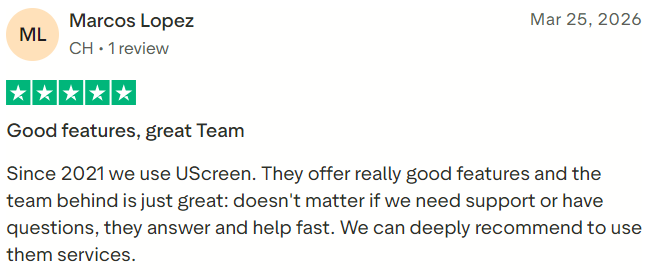
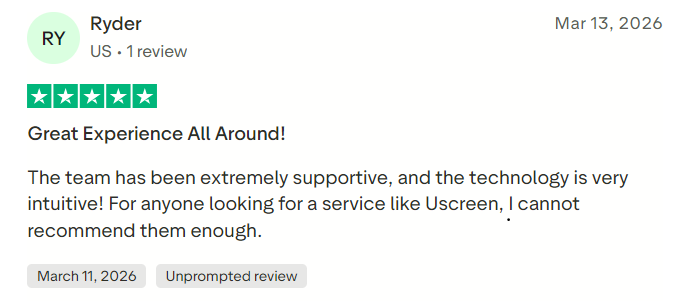
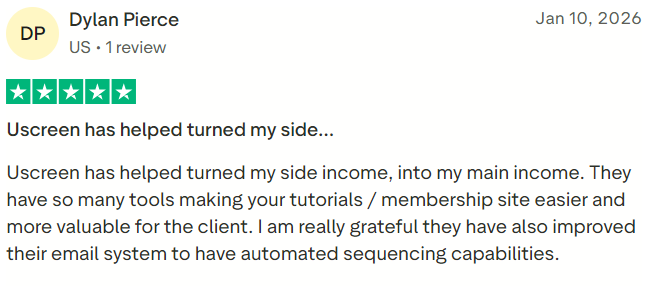
Uscreen has generally strong customer feedback. Capterra listed a rating of 4.7 out of 5 based on 125 reviews when checked in July 2026. Reviewers frequently identify video delivery, customer support, branded applications, and the convenience of managing a streaming membership in one place as important strengths. Capterra’s Uscreen listing should be checked for the latest rating and review count.
Reported concerns commonly involve pricing, subscriber charges, feature limitations on lower plans, customization boundaries, and the cost of branded applications. Customer-review scores should be considered alongside a live demonstration and a detailed cost projection because the needs of a small course creator differ considerably from those of an established streaming company.
#1.
#2.
#3.
Uscreen Pros
Uscreen’s main advantage is its concentration on premium video memberships. It combines hosting, subscriptions, livestreaming, websites, customer management, payments, analytics, and applications in a coordinated system. The Netflix-style catalog creates a professional experience, while the availability of branded mobile and television applications helps established creators distribute content across devices.
Its flexible monetization options are another strength. Businesses can combine memberships with rentals, pay-per-view events, bundles, donations, and one-time purchases. Native livestreaming and community functionality can also increase member participation and make subscriptions more valuable.
Uscreen Cons
The largest drawback is cost. Growth includes a $1.99 monthly charge for every subscriber, while the application plans begin at several hundred dollars per month and may require annual billing. One-time-sale fees, payment processing, extra storage, and livestreaming overages can increase the effective expense considerably.
Feature distribution is another concern. Mobile applications require App Essentials, while television apps, API access, advanced community functions, white labeling, and group subscriptions are concentrated in the Custom service. The platform may therefore become expensive when a business needs a particular combination of advanced features.
Uscreen is also centered on video. It is less appropriate for businesses requiring advanced assessments, assignments, academic grading, SCORM support, detailed learning paths, or extensive text-based course authoring.
Uscreen Alternatives
Kajabi may be a better option for creators who need online courses, email marketing, landing pages, funnels, and coaching products in one creator-oriented platform. Vimeo OTT is a relevant alternative for media businesses focused primarily on streaming distribution. Mighty Networks and Circle are stronger candidates when community interaction is more important than a sophisticated video catalog.
Thinkific, LearnWorlds, and LearnDash are more appropriate for conventional online education requiring lessons, quizzes, certificates, and structured learning. Passion.io is worth considering when a branded mobile application is the principal requirement, while Muvi may appeal to organizations seeking broader OTT infrastructure and deployment choices.
Who Should Use Uscreen?
Uscreen is best suited to established video creators, fitness and wellness businesses, educators, entertainment publishers, sports organizations, faith communities, and media companies seeking recurring membership revenue. It becomes particularly compelling when customers need to watch a growing content library regularly across web, mobile, and television devices.
It may also suit a creator with an existing audience who wants to move away from advertising-supported platforms and build a direct customer relationship. The combination of branded distribution, payments, engagement, and member data provides more control than publishing exclusively through a social-video marketplace.
Final Verdict
Uscreen is a capable and specialized platform for building a paid video membership or branded streaming service. Its strongest qualities are its professional video catalog, flexible monetization, native livestreaming, integrated membership management, and availability of mobile and television applications.
Its value depends heavily on the business model. A well-established creator with recurring subscribers and a substantial video library can benefit from replacing several disconnected products with one platform. A new creator with limited revenue may find the subscription, subscriber, storage, and transaction charges difficult to absorb.
Prospective customers should evaluate Uscreen using their expected subscriber count, one-time sales, monthly streaming hours, storage requirements, required applications, and payment-processing costs. The product is best viewed as infrastructure for a serious video membership business rather than an inexpensive course builder or basic video host.
