

Podia is an all-in-one platform for creating and selling online courses, digital downloads, coaching, memberships, community access, and events. It combines these selling tools with a website builder, blogging, checkout, email marketing, customer messaging, affiliate management, and basic analytics.
The platform is designed primarily for independent creators and small knowledge businesses that want to manage their website, products, customers, and marketing without combining numerous services. Podia says more than 15,000 creators operate their businesses through the platform. Its main strengths are ease of use, integrated features, unlimited customers, and the absence of Podia transaction fees on its higher plans.
Podia’s limitations include relatively high subscription prices, a 5% transaction fee on its entry-level plan, subscriber-based email costs, product limits on two plans, and less advanced customization or course administration than some specialist alternatives.
Explore The AI-Linked Asset Class Elites are Investing In
What Is Podia?
Podia is a hosted commerce and content-delivery platform for educators, coaches, consultants, writers, artists, and other digital entrepreneurs. It supplies the technical infrastructure needed to build a website, create sales pages, accept payments, deliver content, manage customers, and send marketing emails.
Creators can use Podia to sell self-paced courses, cohort programs, ebooks, templates, audio, video, coaching sessions, webinars, workshops, memberships, subscriptions, communities, and product bundles. Free products can also be distributed as lead magnets to build an email list.
Because Podia is hosted, users do not need to arrange separate web hosting or maintain WordPress plugins. Product delivery, customer accounts, checkout, website pages, and updates are handled within the subscription.
How Podia Works
After opening an account, a creator builds a Podia website and creates one or more products. The user uploads content, establishes pricing and access conditions, connects Stripe or PayPal where supported, and customizes the product’s sales page.
When a customer purchases, Podia processes the order through the connected payment provider and places the product in the customer’s account. Students can watch lessons, members can enter community spaces, buyers can retrieve their files, and coaching clients can access scheduling instructions.
Customer information, sales, product access, email activity, subscriptions, and conversations are managed through a central dashboard.
Online Courses
Podia includes a course builder for organizing educational material into lessons and sections. Lessons can contain video, audio, formatted text, downloadable files, quizzes, and embedded resources from external services.
Course creators can release sections gradually, establish a future start date, restrict the number of students, set an access duration, provide preview lessons, enable comments, and issue completion certificates. The platform also supports self-paced courses, presales, waitlists, and cohort-based programs.
Students receive personal dashboards showing their purchases and progress. Administrators can review enrollment dates, recent activity, completed lessons, and quiz results. Podia does not impose a separate per-student fee, although each pricing plan has other product and media limits.
Bonus Free Guide Included
Course Assessments
Podia supports multiple-choice and multiple-answer quizzes for checking learner comprehension. Instructors can review individual quiz scores and general student progress.
These assessment tools are adequate for creator-led courses but are less sophisticated than those in advanced learning-management systems. Podia is not the strongest choice for organizations requiring question banks, essay grading, formal assignments, SCORM packages, learning paths, proctoring, regulatory compliance, or accredited examinations.
Drip Content and Access Limits
Course sections can be released according to the number of days that have passed since enrollment. This allows creators to provide weekly modules, structured challenges, or other programs in which students should not receive everything immediately.
Podia can also limit access to a specified number of days. Once that period ends, the customer’s enrollment expires automatically. This can be helpful for cohort programs, certification preparation, coaching packages, and time-limited memberships. Creators should test drip schedules, start dates, late enrollments, and access expiration before launching.
Course Certificates
Podia can issue certificates when students complete a course. Certificates may improve motivation and give learners evidence of participation.
A Podia certificate does not automatically represent professional accreditation. Creators should clearly distinguish between an informal completion certificate and a credential recognized by an employer, professional organization, or regulator.
Video and File Hosting
Podia allows creators to upload video and audio directly, and it provides a built-in media player. Each individual digital-download file can be as large as 5 GB, while plan-level video allowances apply to uploaded media.
The Mover plan currently permits 500 videos, Shaker allows 1,000, and Earthquaker provides unlimited videos. Creators can also embed externally hosted content from platforms such as YouTube, Vimeo, Loom, and other supported services.
A creator planning a large media library should clarify how Podia counts videos, whether duplicates are counted separately, and what happens after a plan allowance is reached.
Digital Downloads
Creators can sell ebooks, templates, workbooks, spreadsheets, design files, audio, videos, images, ZIP archives, and many other downloadable products. A single product can contain unlimited files, with each file measuring up to 5 GB.
Paying customers receive their files through Podia, while free downloads can be delivered in exchange for an email address. Creators can choose whether recipients receive the file directly by email or create a customer account.
Podia works well for standard downloads, but sellers requiring sophisticated software licensing, device activation, digital-rights management, product variations, or inventory-style controls may need additional software.
Coaching Products
Podia can be used to sell private or group coaching. Creators build a coaching sales page, charge customers before scheduling, and connect an external booking service.
Documented scheduling options include Calendly, Squarespace Scheduling, YouCanBookMe, and SavvyCal. Coaching products can also contain written instructions, files, preparation material, downloads, events, courses, or community access.
Podia handles the sales and content side of the relationship but does not provide a comprehensive coaching-management system. Professionals requiring digital contracts, client notes, assessments, goals, session tracking, practitioner assignments, or advanced engagement reporting may prefer Paperbell, Delenta, or CoachAccountable.
Webinars and Events
Podia supports virtual and in-person events. Creators can establish event dates, locations, prices, attendance limits, and registration pages. Events can be sold individually or combined with courses, downloads, coaching, and community access.
Podia does not itself replace a complete webinar-broadcasting service. Virtual events generally require a meeting or webinar link from Zoom, YouTube Live, Crowdcast, or another provider. The creator remains responsible for presentation, recording, attendance management, and technical delivery through the chosen external service.
Product Bundles
Courses, downloads, coaching, events, and community access can be combined into a bundle. This allows creators to sell several related resources under one price.
Bundles are useful for signature programs, resource libraries, professional packages, and premium offers. A coaching bundle, for example, might contain private sessions, a preparatory course, downloadable worksheets, and community access.
Creators should verify how subscriptions, expiration periods, refunds, and access changes affect the individual products included in a bundle.
Community
Podia includes a community platform connected to the creator’s products, website, and customer accounts. Members can participate in topic-based spaces, publish posts, comment, and communicate through group or direct messages.
Community features include member profiles, activity feeds, privacy settings, notifications, pinned posts, welcome messages, custom badges, and separate spaces for different subjects or membership levels. Creators can establish free and paid membership tiers and include access within product bundles.
The community is convenient for creators who want courses and discussions in one place. However, businesses prioritizing sophisticated social networking, gamification, livestreaming, mobile applications, discovery, extensive moderation, or detailed engagement reporting may find Circle, Mighty Networks, or Skool more suitable.
Memberships and Subscription Plans
Creators can use Podia plans to charge monthly or annual fees for recurring access. Memberships may provide community spaces, courses, downloads, events, coaching resources, or combinations of these products.
Free trials can be attached to subscriptions, allowing customers to use the service before their first charge. Podia can also display an upgrade option inside a community so free members can move to a paid level.
Businesses should define cancellation rules, trial periods, refund conditions, content ownership, and what happens when a recurring payment fails. Membership revenue should also be monitored for churn and involuntary cancellations.
Website Builder
Every paid Podia subscription includes a hosted website builder. Users can create a homepage, sales pages, landing pages, About and Contact pages, legal pages, blog posts, and unlimited custom pages.
The editor provides themes, reusable sections, layouts, images, colors, typography, buttons, embeds, and mobile-responsive designs. Creators can connect custom domains and modify basic search metadata, including page titles and descriptions.
Podia’s builder is easier to operate than a self-hosted WordPress website, but it offers less development freedom. Businesses requiring custom databases, extensive theme ecosystems, unusual page structures, advanced technical SEO, or complex ecommerce functionality may eventually need another website platform.
Blogging and SEO
Podia includes a blogging system that allows creators to publish articles from the same website used for products and email subscriptions. Blog posts can attract search traffic, educate potential customers, and direct readers toward courses or lead magnets.
The platform provides basic SEO controls such as titles and descriptions. This is sufficient for straightforward creator websites, although professional publishers may prefer WordPress or another content-management system offering advanced schema, plugin ecosystems, editorial workflows, redirects, and technical optimization.
Custom Domains and Branding
Creators can connect a domain purchased through an external registrar. Podia hosts the website, while the creator remains responsible for domain registration and renewal.
The platform also allows users to adjust colors, fonts, themes, layouts, and imagery. Podia branding can be removed where the selected plan and settings allow it.
Businesses should retain control of their domain registrar and maintain copies of DNS records. This makes a future migration easier and prevents the company’s public identity from becoming unnecessarily dependent on the Podia subdomain.
Checkout and Payments
Podia provides a one-page checkout and supports more than 20 currencies. Customers can pay with cards through Stripe and may also use Apple Pay, Google Pay, iDEAL, SEPA Debit, and other supported regional methods.
PayPal is available on the Shaker and Earthquaker plans but not Mover. Availability of payment types depends on the buyer’s device, location, currency, product, and connected processor.
Revenue is sent to the creator’s connected payment account rather than being held under a universal Podia payout schedule. Stripe or PayPal processing times, reserves, verification requirements, and dispute policies therefore affect when money becomes available.
Payment Plans and Subscriptions
Creators can offer installments so customers can divide an expensive purchase into several payments. This can make courses, bundles, and coaching programs more affordable.
Podia also supports recurring subscriptions and free trials. Sellers should remember that installment plans create collection risk because future charges can fail after the customer has received some or all of the service. Refund, cancellation, access, and missed-payment rules should be explained before checkout.
Coupons, Upsells, and Funnels
Podia supports fixed and percentage-based coupon codes for promotions. Sellers can also recommend related products after a purchase and, on eligible plans, create upsells that increase average order value.
The platform’s checkout features include order-building tools such as payment plans, upsells, downsells, and sales sequences. These are useful for straightforward creator funnels but may not match the testing, page control, attribution, and conditional behavior offered by specialist funnel builders.
Affiliate Marketing
The Shaker and Earthquaker plans include affiliate marketing. Creators can invite affiliates, establish commissions, generate tracked links, and review clicks, sales, and earnings.
Affiliates receive individual dashboards for monitoring performance. Sellers remain responsible for establishing payout schedules, reversing commissions after refunds, managing promotional conduct, and complying with disclosure and tax requirements.
Mover users who need affiliate marketing must upgrade or use a third-party tracking service.
Email Marketing
Podia Email is integrated with products, customers, courses, and community memberships. Creators can send one-time broadcasts and create automated campaigns triggered by activities such as joining a list, registering for a webinar, or purchasing a product.
The system supports segmentation, tags, forms, email templates, performance reporting, and revenue attribution. Because commerce and email data are kept together, creators can communicate with customers without synchronizing every purchase to an outside system.
Each subscription includes email access for a limited number of subscribers. Mover includes 100 subscribers, Shaker includes 500, and Earthquaker includes 1,000. Businesses with larger lists must purchase additional capacity. Podia says it warns users when they approach their limit and does not automatically upgrade their email tier.
Podia Email is suitable for many creator businesses, but organizations requiring advanced lead scoring, predictive segmentation, complicated branching, multichannel campaigns, or enterprise deliverability tools may still prefer specialized software.
Live Chat and Customer Messaging
Podia provides a live-chat widget that can appear throughout the creator’s website. Visitors and customers can send messages, while the creator manages conversations from a centralized inbox.
Community members can also participate in group chats and direct member-to-member conversations. Messages may contain formatted text, images, video, GIFs, emojis, and reactions.
These tools can improve customer service and community engagement, but businesses must establish response expectations and moderation rules. A large support operation may still need a help-desk platform with ticketing, service-level reporting, automation, and staff assignments.
Customer Management
Every buyer is added to a central customer list. Administrators can review purchases, access status, subscriptions, messages, and relevant activity.
Tags and segments help creators organize customers according to their products or behavior. CSV imports can bring existing customers into Podia, and customer accounts give buyers a single place to access everything they have purchased.
The system functions as a creator-focused customer database rather than a complete sales CRM. Advanced pipelines, lead scoring, deal management, account hierarchies, and sales-team forecasting require another service.
#1.
#2.
#3.
Analytics and Reporting
Podia includes reporting for sales, revenue, customers, subscriptions, courses, email, and affiliates. Course administrators can examine enrollments, progress, quiz results, last activity, and completion.
Email reporting helps users monitor delivery, opens, clicks, sales, and campaign performance. Subscription dashboards can show active customers, failed payments, and churn, while affiliate reports identify partners generating clicks and purchases.
These tools are adequate for routine creator-business decisions. Organizations requiring consolidated accounting, advanced attribution, cohort forecasting, custom dashboards, or predictive analysis may need an external analytics platform.
Tax Support
Podia says its checkout supports automatic tax calculation across 230 tax jurisdictions. This can help creators apply the appropriate tax rate according to the customer and transaction.
Sellers should not assume that automated calculation removes every tax responsibility. Registration, filing, remittance, income tax, VAT, GST, sales tax, exemption certificates, and recordkeeping requirements depend on the business and jurisdiction. Professional advice may be necessary.
Integrations
Podia supports direct or documented connections with Stripe, PayPal, Zapier, Google Analytics, Mailchimp, Kit, AWeber, Drip, ActiveCampaign, MailerLite, GetResponse, Flodesk, Discord, Facebook advertising tools, and Pinterest advertising tools.
Creators can embed content from more than 1,900 supported platforms and use Zapier to connect Podia with other applications. External code snippets may also extend tracking or website functionality.
Businesses should verify each integration’s available fields, triggers, actions, and synchronization direction. The presence of an integration does not guarantee support for every desired workflow.
Migration Assistance
Podia offers migration assistance for businesses moving from another platform. Mover customers can receive help migrating up to 50 products, while Shaker and Earthquaker users can migrate as many as 150.
Eligible material includes course text and files, digital downloads, customer email addresses associated with courses or downloads, and free or paid community subscribers. Businesses with larger catalogs must request a separate arrangement.
Before canceling an existing service, creators should test products, customer access, subscriptions, emails, domains, payment links, and redirects inside Podia. Passwords, historical transactions, quiz records, comments, certificates, and detailed analytics may not transfer automatically.
Podia Pricing
Podia currently offers three subscription plans—Mover, Shaker, and Earthquaker—with the advertised rates reflecting annual billing. Mover costs an effective $42 per month, or $504 annually, and carries a 5% Podia transaction fee.
Shaker costs $84 per month when billed annually, totaling $1,008 per year, with no Podia transaction fee. Earthquaker costs an effective $150 per month, or $1,800 annually, and also has no Podia transaction fee.
All plans include courses, downloads, coaching, community, events, a website, custom-domain support, blogging, landing pages, checkout, migration assistance, and email or chat support. Podia provides a 30-day trial without requiring a credit card.
Mover Plan
Mover costs an effective $42 per month when billed annually. It supports unlimited customers, 50 products, 500 videos, 25 community spaces, and 100 included email subscribers.
Podia charges a 5% transaction fee on Mover sales. Stripe’s normal payment-processing charges apply separately. PayPal, affiliate marketing, upsells, and Zapier are not included.
Mover is aimed at beginners, but the 5% fee can become expensive as revenue grows. Compared with the $84 Shaker plan, the additional $42 monthly subscription is offset once the 5% Mover fee reaches $42:
$42÷0.05=$840
At more than approximately $840 in monthly sales, Shaker may cost less than Mover before considering feature differences, taxes, refunds, and processor fees.
Shaker Plan
Shaker costs an effective $84 per month under annual billing. It removes Podia’s transaction fee and includes 150 products, 1,000 videos, 100 community spaces, 500 email subscribers, and one assistant account.
The plan also adds PayPal, Zapier, affiliate marketing, and upselling. Shaker is likely the most practical option for established solo creators and small businesses that generate regular sales.
Stripe and PayPal continue to charge their standard processing fees even though Podia’s platform fee is removed.
Earthquaker Plan
Earthquaker costs an effective $150 per month when billed annually. It provides unlimited products, videos, community spaces, customers, and assistant accounts, together with 1,000 included email subscribers.
Like Shaker, Earthquaker has no Podia transaction fee and includes PayPal, Zapier, affiliates, and upsells. It is intended for businesses requiring larger catalogs, more media, additional staff access, or fewer operational limits.
Because Shaker and Earthquaker have the same platform transaction rate, the decision is based primarily on allowances and team requirements rather than sales volume.
Refund Policy
Podia provides a 30-day free trial so users can test the platform before subscribing. According to its pricing FAQ, customers who have already paid can request a refund within 72 hours of their most recent payment.
Podia does not provide partial refunds for annual subscriptions. Approved refunds may require five to ten business days to appear. Buyers should review the current billing terms before committing to an annual plan.
Additional Costs
The Podia subscription may not represent the complete cost of operating a creator business. Additional expenses can include Stripe or PayPal processing, extra email subscribers, domain registration, scheduling software, webinar services, Zapier, accounting software, advanced analytics, advertising, affiliate commissions, content production, design, legal advice, taxes, refunds, and chargebacks.
Creators selling coaching may require Calendly or another booking tool. Webinar hosts may need Zoom or an equivalent platform, while businesses with advanced email requirements may continue paying for an external email provider.
Ease of Use
Podia is widely regarded as easy to use. Its integrated dashboard and visual editors allow creators to build a site, publish products, collect payments, and send emails without coding.
This simplicity is one of the platform’s greatest advantages. It reduces the setup work involved in connecting a website, checkout, course platform, community, and email service.
The tradeoff is reduced depth. Advanced designers, course administrators, marketers, and ecommerce operators may encounter limits sooner than users of more specialized systems.
Customer Support and Reviews
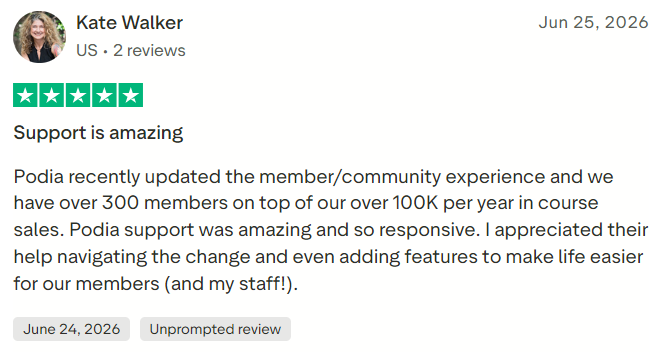
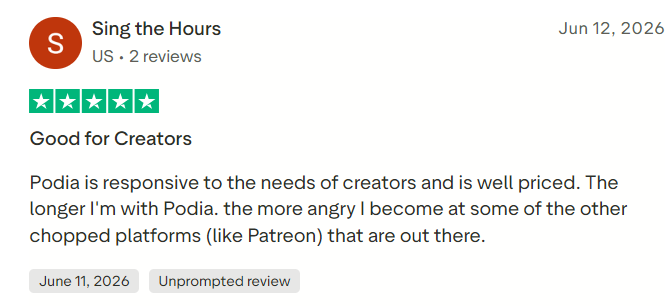
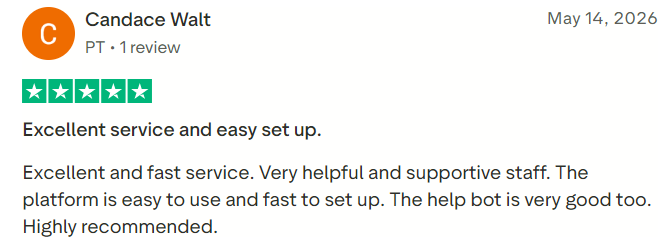
Podia provides email and chat support together with an extensive help center. Reviews often praise the platform’s straightforward interface and human support, although some users report limitations, pricing concerns, and inconsistent experiences with automated assistance.
As of August 2026, Podia had a Trustpilot rating of 3.9 out of 5 from 134 reviews. Approximately 60% were five-star reviews, while 29% were one-star reviews. Trustpilot noted that Podia typically responded to negative feedback within 48 hours. Readers should check the current Podia Trustpilot profile, as scores and totals change.
Capterra currently reports an ease-of-use rating of 4.5 and a customer-service rating of 4.6. These figures suggest generally positive experiences but should be considered alongside the more mixed Trustpilot results.
Podia Pros
Podia consolidates courses, downloads, coaching, events, communities, websites, blogs, email, checkout, chat, and customer management into one service. Its interface is accessible to beginners, and every plan supports unlimited customers.
Other advantages include direct video hosting, course certificates, drip content, subscriptions, payment plans, bundles, integrated email campaigns, custom domains, tax calculation, migration assistance, and numerous integrations. Shaker and Earthquaker also eliminate Podia’s platform transaction fee.
Podia Cons
Mover charges a 5% transaction fee in addition to Stripe processing costs, making it relatively expensive once sales increase. Its 50-product, 500-video, 25-space, and 100-subscriber limits may also affect growing businesses.
Higher plans are comparatively expensive, and email costs can rise with list size. PayPal, affiliates, upsells, and Zapier require at least Shaker.
Podia’s course assessments, website customization, community functionality, automation, reporting, and CRM features are useful but less advanced than those of specialist platforms. Coaching and webinars also depend partly on external scheduling or meeting software.
Who Should Use Podia?
Podia is best suited to independent educators, course creators, coaches, consultants, authors, community operators, and digital-product sellers who want an integrated platform with minimal technical administration.
Shaker is particularly attractive to established creators who generate more than approximately $840 per month and need PayPal, affiliates, upsells, or Zapier. Earthquaker is better suited to larger catalogs and teams requiring unlimited allowances.
Is Podia Worth It?
Podia is worth considering when its integrated features replace several separate subscriptions. A creator who would otherwise pay for website hosting, course software, email marketing, community tools, checkout, and customer messaging may find Podia economical and easier to manage.
Mover is less compelling for businesses with regular sales because its 5% transaction fee can quickly exceed the price difference between Mover and Shaker. Shaker is likely to offer the best balance for many established solo creators, while Earthquaker serves larger catalogs and teams.
The decision should account for product volume, video usage, community spaces, email-list size, staff accounts, payment gateways, and required integrations—not only the headline subscription price.
Final Verdict
Podia is a capable all-in-one platform for creators selling courses, downloads, coaching, memberships, and events. Its strongest qualities are its ease of use, integrated website and email tools, direct product delivery, unlimited customers, community features, and absence of platform transaction fees on Shaker and Earthquaker.
Its principal weaknesses are Mover’s 5% transaction fee, relatively high subscription pricing, subscriber-based email expenses, and less advanced functionality than specialist learning, marketing, website, or community platforms.
Overall, Podia is best suited to creators who value simplicity and want most of their digital business in one system. Shaker offers the most balanced package for businesses earning regular revenue, while specialized or enterprise users may need a more powerful alternative.
